
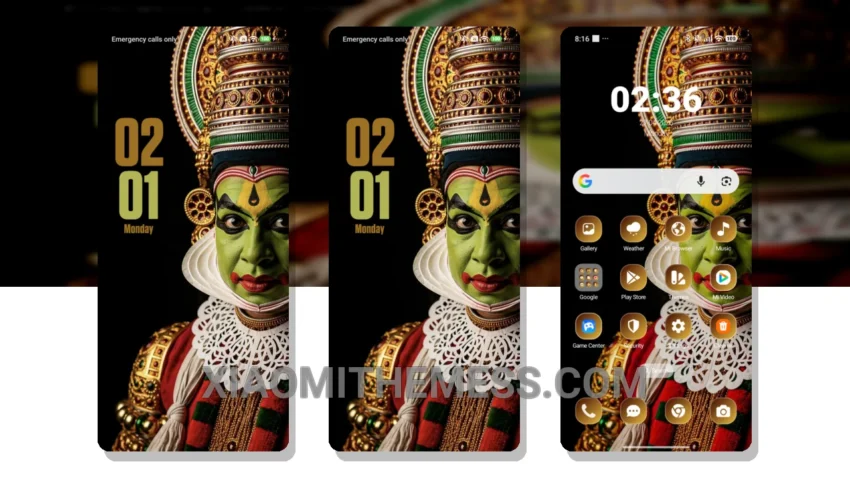
Dark mode is my go-to. Saves battery, reduces eye strain. Kathakali Grandeur, a theme that embodies elegance. Designed for Xiaomi and HyperOS, it’s a must-try for those who appreciate the beauty of dark interfaces.
Fast. Smooth. 120Hz animations make navigation a breeze. No lag, no stutter. Just a seamless experience.
Kathakali Grandeur is more than just a theme. It’s an experience. With its dark mode optimization, you can enjoy your device without worrying about battery drain. Plus, the theme is lightweight, ensuring no performance impact.
Customization Options
In terms of customization, Kathakali Grandeur offers a range of options. From icon packs to custom boot animations, you can personalize your device to your heart’s content.
One thing to note, though, is that the theme may not be suitable for everyone. The dark mode can be overwhelming for some users, especially in bright environments.
To be honest, I’m impressed with Kathakali Grandeur. The attention to detail, the elegance of the design… it’s a theme that truly stands out. If you’re looking for a dark mode theme that’s both beautiful and functional, look no further.
Kathakali Grandeur is fully compatible with HyperOS, MIUI 12, MIUI 13, and MIUI 14, making it a great choice for Xiaomi and HyperOS users. With its clean interface and premium UI, you’ll enjoy a lag-free experience like never before.
Theme Information
🛠️ How to Install This MTZ Theme
- Download the MTZ file to your device.
- Open the official Themes app and go to your profile.
- Import & Apply the downloaded file.