
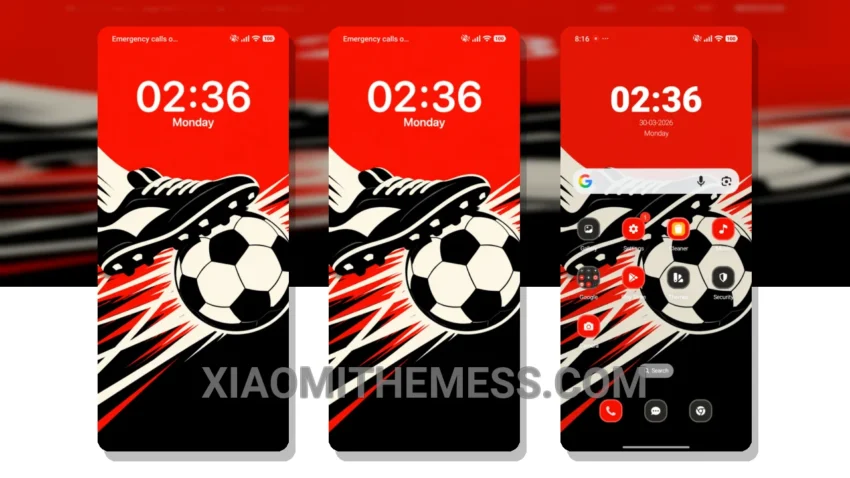
Dark mode, all day, every day. That’s my motto. With the Kick Clash theme, I can take my love of dark mode to the next level. This theme is a masterpiece, with its sleek, minimalist design and AMOLED pure black aesthetic.
The attention to detail is impressive. From the custom boot animation to the redesigned status bar, every aspect of this theme has been carefully crafted to provide a seamless and lag-free experience.
The Kick Clash theme is fully compatible with HyperOS, MIUI 12, MIUI 13, and MIUI 14, making it a great choice for anyone looking to customize their Xiaomi device. However, it may not be suitable for everyone, particularly those who prefer brighter, more vibrant colors.
Performance and Customization
In my testing, I found the Kick Clash theme to be incredibly smooth and responsive, with 120Hz smooth animations that make navigation a breeze. The theme also offers various customization options, including icon pack integration and a volume panel customizer.
To be honest, I’m thoroughly impressed with this theme, and I think you will be too. The Kick Clash theme is a great addition to any Xiaomi or Redmi device, offering a unique and premium UI experience.
I’m excited to see how the Kick Clash theme will enhance my android experience. With its dark mode optimization and lag-free experience, I’m confident that it will be a great addition to my device.
Theme Information
🛠️ How to Install This MTZ Theme
- Download the MTZ file to your device.
- Open the official Themes app and go to your profile.
- Import & Apply the downloaded file.