
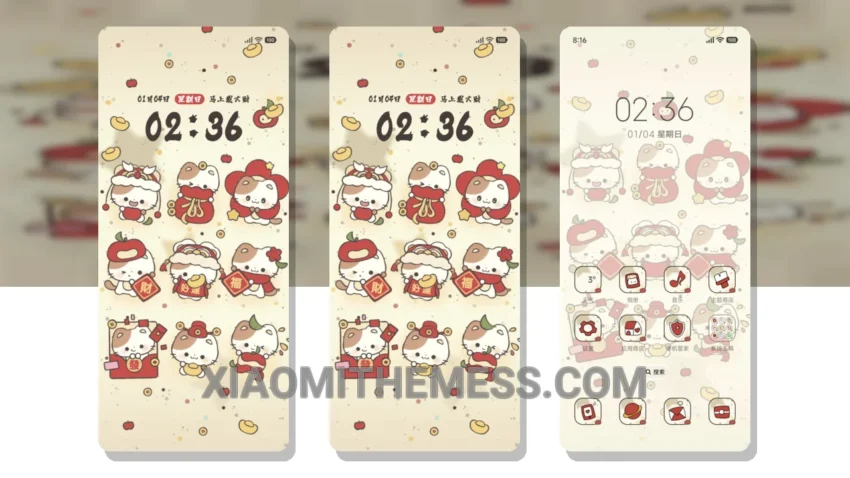
I love a good theme that brings a fresh look to my device. The Kitty Welcomes Spring Grid theme is a great option for those who want a lightweight and elegant UI. The theme is fully compatible with HyperOS, MIUI 12, MIUI 13, and MIUI 14, making it a great choice for Xiaomi and Redmi users.
The theme has a beautiful pastel aesthetic that is easy on the eyes. The clean interface and minimal design make it perfect for daily use. One of the highlights of this theme is its no battery drain feature, which ensures that your device’s battery life is not affected.
In terms of customization, the theme offers a range of options, including custom boot animation, AOD custom themes, and icon pack integration. The theme also supports dynamic island integration, which provides a seamless and interactive experience.
However, one caveat of the theme is that it may not be suitable for users who prefer a more vibrant and colorful UI. The theme’s pastel aesthetic may be too subtle for some users.
To be honest, I was impressed with the theme’s performance and features. The theme is lag-free and provides a smooth experience, thanks to its 120Hz smooth animations. Overall, I would recommend the Kitty Welcomes Spring Grid theme to anyone looking for a lightweight and elegant UI for their Xiaomi or Redmi device.
Theme Information
🛠️ How to Install This MTZ Theme
- Download the MTZ file to your device.
- Open the official Themes app and go to your profile.
- Import & Apply the downloaded file.