
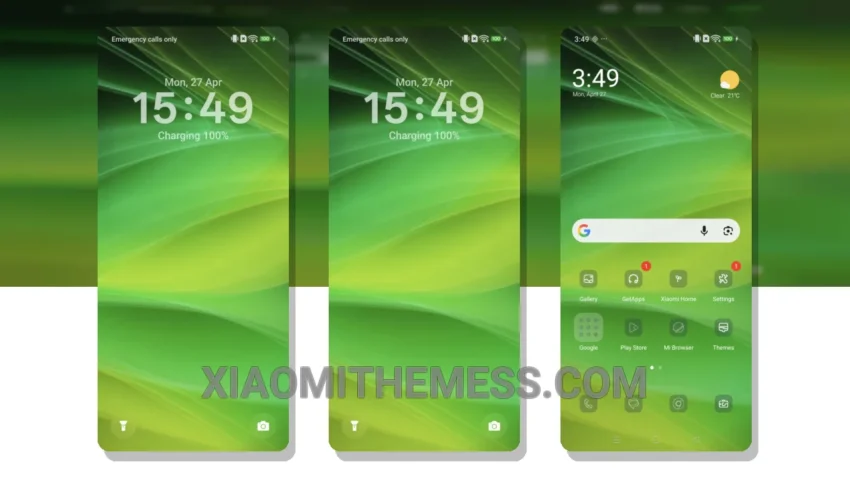
I’m loving the new Kolorgreen theme. It’s fresh, it’s green, and it’s perfect for my Xiaomi device. The theme is fully compatible with HyperOS, MIUI 12, MIUI 13, and MIUI 14, so I don’t have to worry about any compatibility issues.
The Kolorgreen theme has a clean interface that’s easy on the eyes. The pastel aesthetic is soothing, and the minimal design makes it perfect for those who want a clutter-free home screen. Plus, it’s optimized for dark mode, which is a must-have for me.
One of the best things about the Kolorgreen theme is its lightweight design. It doesn’t cause any battery drain, which is a common problem with some themes. The theme is also highly customizable, with options for icon pack integration and custom control center.
However, I do wish the theme had more advanced widgets. The current widgets are nice, but they’re a bit limited. Still, the theme’s overall design and performance make up for this caveat.
In my testing, the Kolorgreen theme has been a joy to use. The 120Hz smooth animations make navigating through my device a breeze, and the theme’s system optimization ensures a lag-free experience. To be honest, I’m impressed with the Kolorgreen theme, and I think it’s a great choice for anyone looking for a fresh, green theme for their Xiaomi device.
Conclusion
Overall, the Kolorgreen theme is a great choice for Xiaomi users who want a clean, minimal, and battery-efficient theme. With its compatibility with HyperOS, MIUI 12, MIUI 13, and MIUI 14, and its customizable options, it’s a theme that’s hard to beat.
Theme Information
🛠️ How to Install This MTZ Theme
- Download the MTZ file to your device.
- Open the official Themes app and go to your profile.
- Import & Apply the downloaded file.