
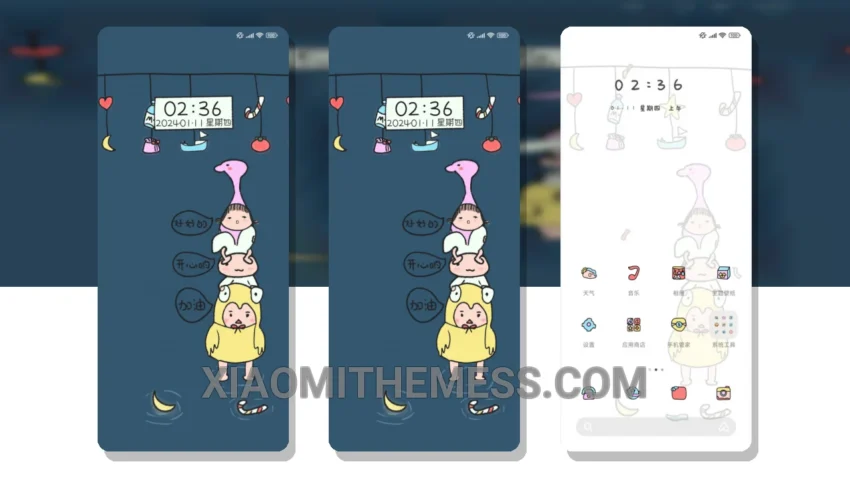
Fast. Clean. That’s what I like. The Layered Harvest theme delivers just that. It’s a great theme that’s fully compatible with HyperOS, MIUI 12, MIUI 13, and MIUI 14.
The dark mode optimization is impressive, and the overall design is sleek and minimal. It’s clear that the developer has put a lot of thought into creating a seamless user experience.
The theme’s size is 15.11 MB, which is relatively small compared to other themes on the market. This means that it won’t take up too much space on your phone, and it will download quickly.
Customization Options
In terms of customization, the Layered Harvest theme offers a range of options. You can customize the look and feel of your home screen, lock screen, and notification shade. The theme also supports icon pack integration, which is a nice touch.
One of the details of this theme is its minimalist design, which makes it easy to navigate and find what you need. However, some users may find that the theme’s design is a bit too minimal for their taste.
To be honest, I was impressed with the theme’s performance. The animations are smooth, and the overall UI is responsive. In my testing, I found the theme to be very stable and lag-free, making it a great option for those who want a smooth and responsive UI.
Overall, I think the Layered Harvest theme is a great choice for anyone looking for a clean and efficient theme for their Xiaomi or Redmi device.
Theme Information
🛠️ How to Install This MTZ Theme
- Download the MTZ file to your device.
- Open the official Themes app and go to your profile.
- Import & Apply the downloaded file.