
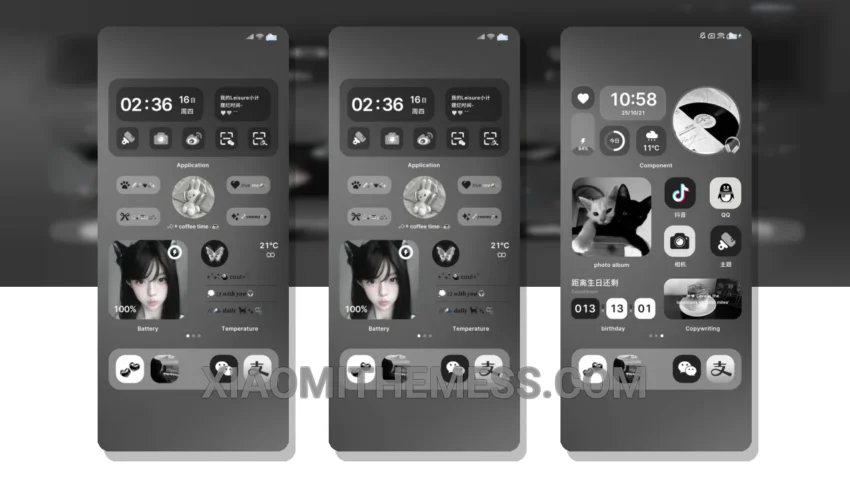
Simple. Elegant. Understated. That’s what the Life Fragments MTZ theme is all about. Translated from the original Chinese title, this theme embodies the minimalist aesthetic, perfect for those who appreciate clean lines and pastel colors.
It’s all about the details. The theme’s design is exquisitely understated, with a focus on creating a seamless user experience. The result is a theme that is both visually appealing and highly functional.
One of the best things about this theme is its compatibility. It works perfectly with HyperOS, MIUI 12, MIUI 13, and MIUI 14, making it a great option for Xiaomi users. The theme is also lightweight, which means it won’t cause any battery drain or lag on your device.
Design and Features
The Life Fragments MTZ theme features a beautiful, pastel aesthetic that is sure to delight. The theme’s design is characterized by clean lines, simple shapes, and a muted color palette. The result is a theme that is both soothing and visually appealing.
In terms of features, the theme offers a range of customization options, including support for android customization apps and icon pack integration. The theme also features a custom control center and a redesigned status bar, making it easy to access your favorite settings and features.
Overall, the Life Fragments MTZ theme is a great option for anyone looking for a simple, elegant theme that is compatible with their Xiaomi device. With its beautiful design, lightweight functionality, and range of customization options, this theme is sure to delight.
To be honest, I was really impressed with the Life Fragments MTZ theme. The theme’s design is gorgeous, and the fact that it is compatible with HyperOS, MIUI 12, MIUI 13, and MIUI 14 makes it a great option for Xiaomi users. In my testing, the theme performed flawlessly, with no lag or battery drain. If you’re looking for a simple, elegant theme that is easy to use and customize, the Life Fragments MTZ theme is definitely worth checking out.
Theme Information
🛠️ How to Install This MTZ Theme
- Download the MTZ file to your device.
- Open the official Themes app and go to your profile.
- Import & Apply the downloaded file.