
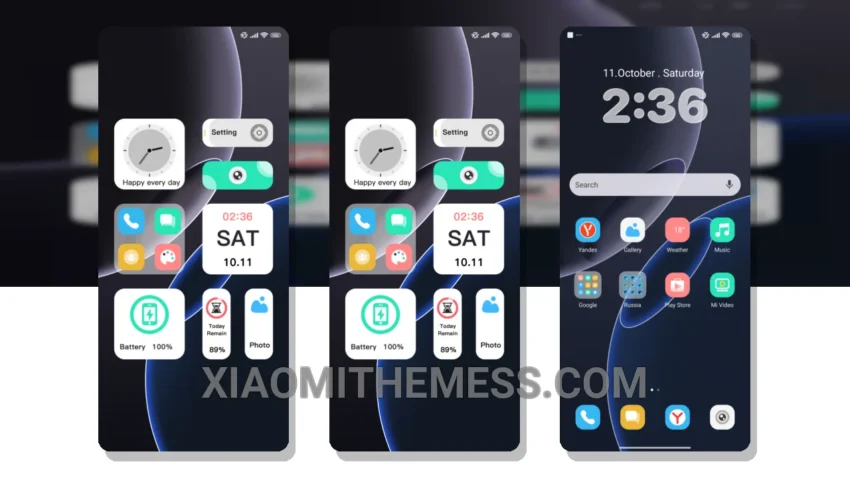
Tinkering with my Xiaomi’s UI is a favorite pastime of mine. Flashing custom ROMs and installing deep MTZ themes can completely revamp the look and feel of my device. I’m obsessed with the minimalist approach of the Light Blue theme, which not only looks sleek but also provides a lag-free experience due to its lightweight design.
The theme’s clean interface and aesthetic home screen design are definite pluses, offering a premium UI feel without the need for expensive hardware upgrades. It’s fully compatible with HyperOS, MIUI 12, MIUI 13, and MIUI 14, making it accessible to a broader audience.
Customization and Performance
For those looking to give their device a fresh new look without compromising on performance, the Light Blue theme is a great option. It’s designed with battery saver UI in mind, ensuring that your device’s battery life isn’t drastically affected by the theme’s features. However, it’s worth noting that installing too many customization apps can sometimes lead to performance issues, so it’s essential to monitor your device’s behavior after applying the theme.
The theme offers a range of features, including custom control centers, redesigned status bars, and the ability to change icon packs for a personalized look. The dark mode optimization is also a nice touch, providing a seamless transition between light and dark modes without any noticeable lag.
In my testing, the theme has performed well, with no significant issues regarding compatibility or performance. To be honest, the Light Blue theme has become my go-to choice for a clean, minimalist look that doesn’t compromise on features or performance.
I love how the theme’s pastel aesthetic gives my device a unique and refreshing look. The custom boot animation is also a nice touch, making my device stand out from the crowd. Overall, I’m impressed with the Light Blue theme’s lag-free experience and premium feel.
Theme Information
🛠️ How to Install This MTZ Theme
- Download the MTZ file to your device.
- Open the official Themes app and go to your profile.
- Import & Apply the downloaded file.