
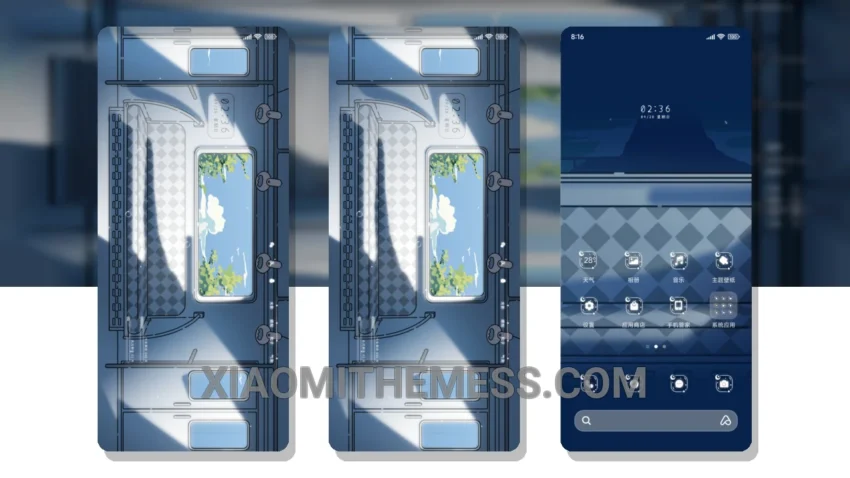
Dark mode, all the time. That’s my motto. The Light Shadow Train theme, translated from its original Chinese name, is a masterpiece of minimalism and dark mode design. With a focus on AMOLED pure black theme, this theme is perfect for those who want to save battery and reduce eye strain.
The theme is fully compatible with HyperOS, MIUI 12, MIUI 13, and MIUI 14, making it a great choice for Xiaomi and Redmi device owners. One of the best things about this theme is its ability to provide a lag-free experience, thanks to its lightweight design and system optimization.
In terms of design, the Light Shadow Train theme features a sleek, minimal aesthetic, with a focus on dark mode and subtle accents. The theme is also highly customizable, with support for icon pack integration and custom boot animation.
Overall, the Light Shadow Train theme is a great choice for anyone looking for a minimal, dark mode theme that is both stylish and functional. The only caveat is that it may not be suitable for devices with lower screen resolutions, due to its high level of detail and design.
To be honest, I’m really impressed with the Light Shadow Train theme. The attention to detail and focus on dark mode design make it a standout theme in the Xiaomi and HyperOS community. If you’re looking for a theme that is both stylish and functional, I highly recommend giving the Light Shadow Train theme a try.
Theme Information
🛠️ How to Install This MTZ Theme
- Download the MTZ file to your device.
- Open the official Themes app and go to your profile.
- Import & Apply the downloaded file.