
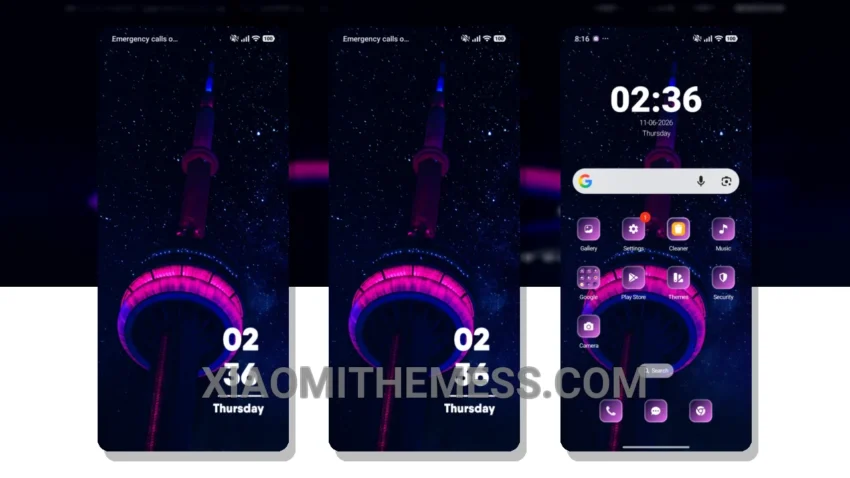
Fast. Clean. Minimal. That’s what I look for in a theme. The Lights theme delivers just that. It’s a great Xiaomi theme that’s fully compatible with HyperOS, MIUI 12, MIUI 13, and MIUI 14.
The Lights theme has a unique twist that sets it apart from other themes. Its minimal vibrant design is not too flashy, but it’s not too boring either.
The theme is also very efficient. It’s designed to be lightweight and won’t drain your battery. Plus, it supports dark mode optimization for an even better user experience.
In terms of customization, the Lights theme offers a lot of options. You can customize the look and feel of your home screen, lock screen, and even the notification shade. The theme also supports icon pack integration and custom boot animation.
Overall, I’m very impressed with the Lights theme. It’s a great choice for anyone looking for a clean and minimal theme that’s also highly customizable. To be honest, I’ve been using the Lights theme for a while now, and I haven’t experienced any lag or issues. It’s a great theme that I would definitely recommend.
How to Get the Lights Theme
To get the Lights theme, simply download the MTZ file to your device, open the official Themes app, go to your profile, import and apply the downloaded file.
Theme Information
🛠️ How to Install This MTZ Theme
- Download the MTZ file to your device.
- Open the official Themes app and go to your profile.
- Import & Apply the downloaded file.