
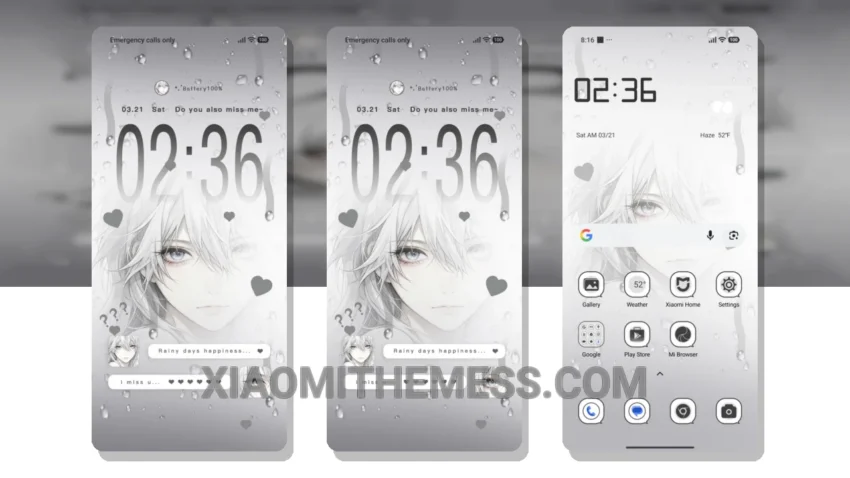
Simple. Elegant. Beautiful. That’s what the Longing Gaze theme is all about. This stunning theme is designed to elevate your Xiaomi or Redmi phone’s aesthetic, providing a clean and uncluttered home screen that’s sure to impress.
Pastel colors. Minimalist design. The Longing Gaze theme is perfect for those who appreciate a subtle yet sophisticated look. And with its 120Hz smooth animations, it’s great for gamers and those who value a responsive user experience.
Performance and Features
The Longing Gaze theme provides a lag-free experience, making it great for gamers and those who value a responsive user experience. Additionally, the theme’s dark mode optimization ensures that your phone’s screen looks great in low-light environments while also helping to conserve battery life.
Some users may find the Longing Gaze theme’s design a bit too minimalist. If you’re looking for a theme with a bit more flair or customization options, you might want to consider alternative Xiaomi themes or android customization apps.
Customization and Personalization
The Longing Gaze theme supports custom control center and redesigned status bar features, allowing you to personalize your phone’s look and feel to suit your preferences. The theme is also incredibly lightweight, which means it won’t slow down your phone or drain your battery.
To be honest, I’m really impressed with the Longing Gaze theme. The attention to detail and focus on aesthetic design make it a standout choice for anyone looking to elevate their phone’s look and feel. Whether you’re a fan of minimal vibrant designs or just want a clean and elegant interface, the Longing Gaze theme is definitely worth checking out.
The Longing Gaze theme is fully compatible with HyperOS, MIUI 12, MIUI 13, and MIUI 14, making it a great option for Xiaomi users. With its beautiful pastel color palette and responsive user experience, this theme is sure to impress. So why not give it a try and see how it can transform your phone’s aesthetic?
Theme Information
🛠️ How to Install This MTZ Theme
- Download the MTZ file to your device.
- Open the official Themes app and go to your profile.
- Import & Apply the downloaded file.