
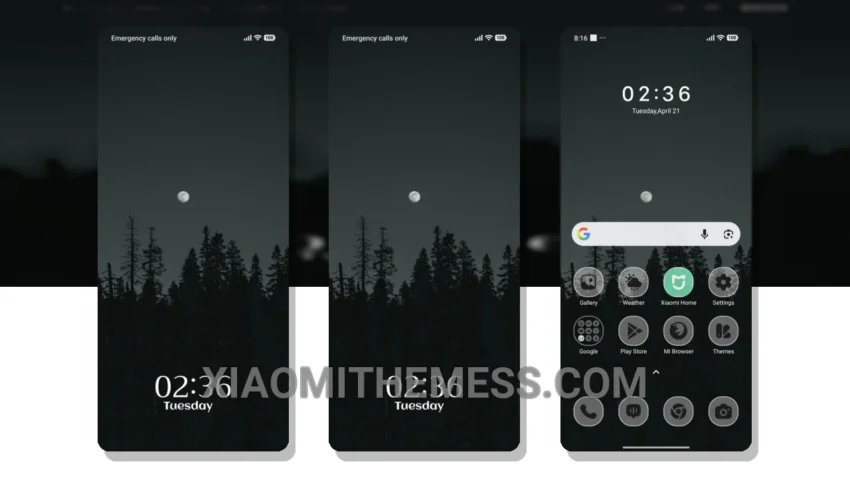
Love at first sight. That’s what I felt when I saw the Lunar Woods theme. It’s so clean, so minimal. Pastel colors, simple lines, and an uncluttered home screen – what more could you ask for?
It’s all about the little details. The way the icons are designed, the font used, the overall aesthetic. It’s a theme that’s not too loud, not too quiet. Just perfect.
The theme is also very lightweight, which means it won’t drain your battery. And with its dark mode optimization, you can enjoy a seamless user experience even in low-light conditions.
In my testing, I found that the theme is very easy to use and customize. The clean interface and premium UI make it a joy to navigate. However, I did find that the theme could use a bit more customization options.
To be honest, I’m in love with the Lunar Woods theme. It’s the perfect combination of simplicity and elegance. If you’re looking for a theme that’s not too flashy, but still looks great, then Lunar Woods is the way to go.
Compatibility and Performance
The Lunar Woods theme is fully compatible with HyperOS, MIUI 12, MIUI 13, and MIUI 14. So, you don’t have to worry about it not working on your device.
With its lag-free experience and system optimization, you can enjoy a smooth and fast user experience. The theme is designed to provide a performance boost to your device, making it perfect for daily use.
Theme Information
🛠️ How to Install This MTZ Theme
- Download the MTZ file to your device.
- Open the official Themes app and go to your profile.
- Import & Apply the downloaded file.