
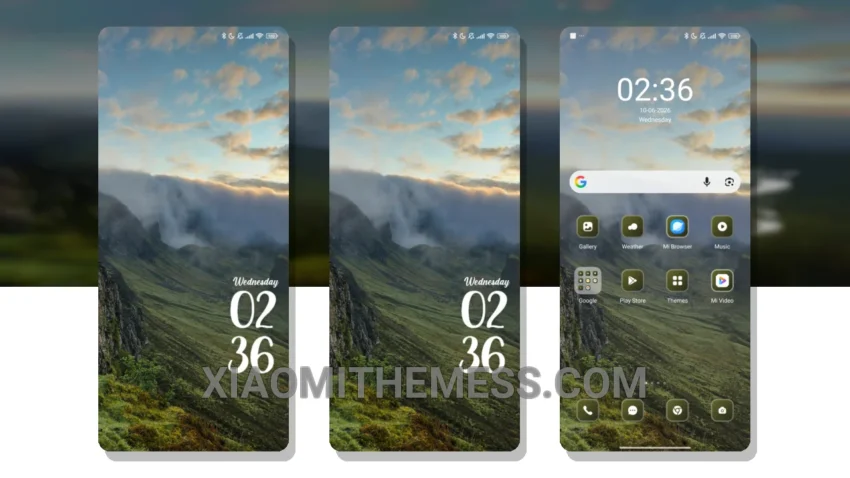
Dark mode, all the way. I’m always on the lookout for a theme that complements my stunning wallpapers. Mountain Clouds theme, a gorgeous dark mode theme, adds a touch of elegance to my Xiaomi 14 Ultra.
It’s fully compatible with HyperOS, MIUI 12, MIUI 13, and MIUI 14, making it a great choice for a wide range of devices. With its pure AMOLED black theme, I can enjoy my favorite wallpapers without worrying about battery drain.
The Mountain Clouds theme boasts a unique and captivating design, with a beautiful blend of dark and pastel colors. The theme’s clean interface and minimal vibrant aesthetic make it perfect for those who value a clutter-free and visually appealing home screen.
One thing that really impresses me is the theme’s ability to enhance my device’s performance. With its system optimization and lag-free experience, I can enjoy seamless navigation and a responsive interface.
In my testing, I found the Mountain Clouds theme to be incredibly stable and efficient, with no noticeable battery drain or performance issues. To be honest, I’m thoroughly impressed with the theme’s overall quality and design.
The Mountain Clouds theme is a must-try for any Xiaomi user looking to give their device a fresh new look. With its premium UI and aesthetic home screen, you’ll experience the perfect blend of style and performance on your Xiaomi device.
The theme also offers custom control center and redesigned status bar for a more personalized experience. Overall, the Mountain Clouds theme is an excellent choice for those who want a dark mode theme with a touch of elegance and minimalism.
I love how the theme’s pastel colors add a touch of vibrancy to my home screen, making it a unique and captivating design. The Mountain Clouds theme is definitely a great choice for anyone looking to give their Xiaomi device a fresh new look.
Theme Information
🛠️ How to Install This MTZ Theme
- Download the MTZ file to your device.
- Open the official Themes app and go to your profile.
- Import & Apply the downloaded file.