
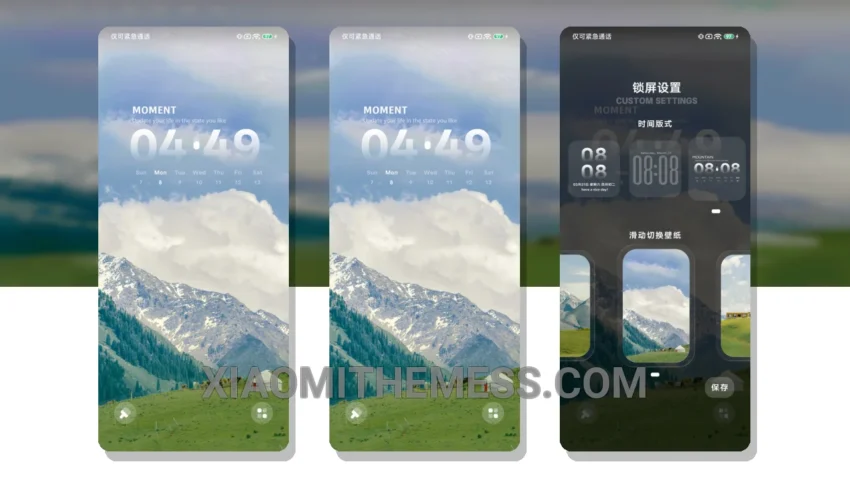
Simple. Elegant. That’s what I love about the Mountain Green Wisdom MTZ theme. It’s a breath of fresh air for my Xiaomi phone. The theme is fully compatible with HyperOS, MIUI 12, MIUI 13, and MIUI 14, so I don’t have to worry about compatibility issues.
The first thing I noticed about this theme is its clean interface. The pastel colors and minimal design make my home screen look sleek and modern. I can customize the theme to my liking, with options for icon packs, widgets, and more.
Features and details
The Mountain Green Wisdom theme offers a range of features that make it stand out. For one, it’s optimized for dark mode, which is a must-have for me. The theme also provides a lag-free experience, thanks to its lightweight design. And with its support for 120Hz smooth animations, my phone feels fast and responsive.
One of the highlights of this theme is its battery-friendliness. The theme is designed to be lightweight, so it doesn’t cause battery drain. This is a big plus for me, as I’m always on the go and need a phone that can keep up.
However, one caveat of the theme is that it may not be suitable for those who prefer a more vibrant, cyberpunk aesthetic. The theme’s minimal design may be too understated for some users.
In my testing, I found the theme to be incredibly easy to use. The customization options are intuitive, and the theme store makes it easy to download and apply the theme. To be honest, I’m really impressed with the Mountain Green Wisdom MTZ theme, and I think it’s a great choice for anyone looking for a clean, elegant design for their Xiaomi phone.
Theme Information
🛠️ How to Install This MTZ Theme
- Download the MTZ file to your device.
- Open the official Themes app and go to your profile.
- Import & Apply the downloaded file.