
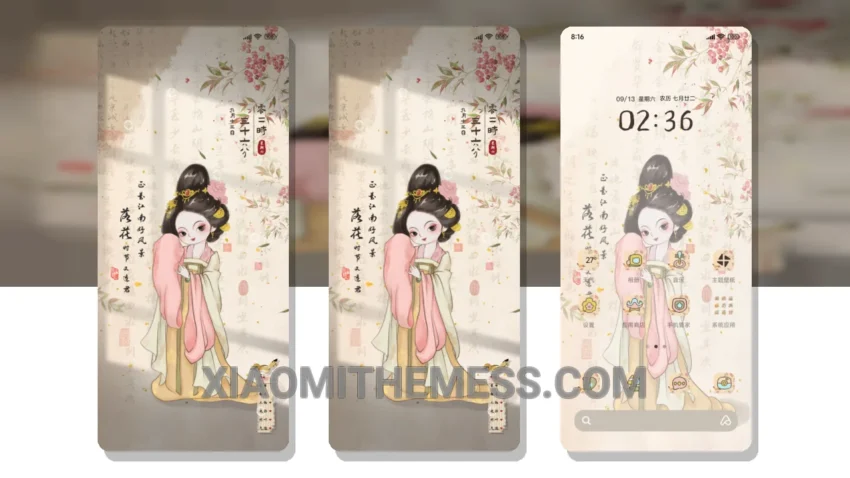
I’m obsessed with the National Wind Girl Light Shadow theme – it’s a total game-changer! This theme is a must-have for anyone who loves a clean and minimalistic look. It’s fully compatible with HyperOS, MIUI 12, MIUI 13, and MIUI 14, so you can install it on your Xiaomi or Redmi device without any issues.
The theme comes with a custom control center, redesigned status bar, and beautiful icons that will give your device a fresh new look. The best part? It’s super lightweight, so you don’t have to worry about it slowing down your device or draining your battery. Plus, it’s optimized for dark mode, which is perfect for saving battery life and reducing eye strain.
One of the things I love about this theme is how it changes the default look of my device. The custom boot animation and AOD custom themes are a nice touch, and the icon pack integration is seamless. The theme also comes with advanced widgets and interactive lockscreen widgets, which add an extra layer of functionality to my device.
In terms of customization, the National Wind Girl Light Shadow theme offers a lot of options. You can customize the look and feel of your device to fit your personal style, from the color scheme to the layout of your home screen. The theme also supports dynamic island integration, which is a great feature for anyone who loves the iPhone’s dynamic island feature.
To be honest, I was a bit skeptical about trying a new theme, but the National Wind Girl Light Shadow theme has won me over. The only downside is that it can be a bit tricky to install, but once you get the hang of it, it’s a breeze. Overall, I’m really impressed with this theme, and I think it’s definitely worth checking out if you’re looking for a fresh new look for your device.
Conclusion
In my testing, the National Wind Girl Light Shadow theme has been a revelation. It’s easy to use, customize, and navigate, and it’s given my device a whole new lease on life. If you’re looking for a theme that’s both functional and aesthetically pleasing, then this is definitely the one for you. So what are you waiting for? Download the National Wind Girl Light Shadow theme today and experience the difference for yourself!
Theme Information
🛠️ How to Install This MTZ Theme
- Download the MTZ file to your device.
- Open the official Themes app and go to your profile.
- Import & Apply the downloaded file.