
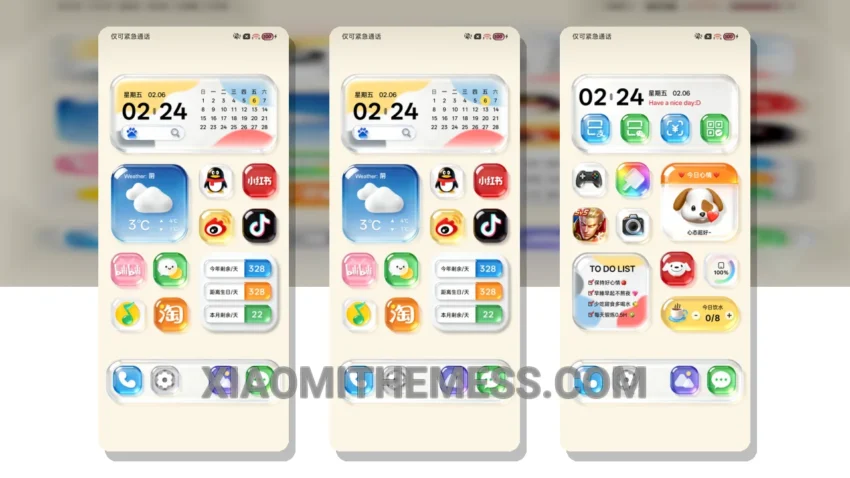
Simple. Elegant. Minimalist. These are the words that come to mind when I think of the Native Glass Icon theme. With its clean lines and pastel colors, this theme is perfect for those who appreciate a clutter-free home screen. The theme’s author, 绝绝紫, has done an excellent job of creating a visually stunning theme that is both aesthetically pleasing and functional.
The Native Glass Icon theme is fully compatible with HyperOS, MIUI 12, MIUI 13, and MIUI 14, making it a great option for Xiaomi and Redmi phone users. One of the best things about this theme is its ability to provide a lag-free experience, thanks to its lightweight design and system optimization. The theme also supports 120Hz smooth animations, making it a joy to use.
In terms of customization, the Native Glass Icon theme offers a range of options, including custom boot animation, AOD custom themes, and icon pack integration. The theme also features a custom control center and redesigned status bar, giving users a unique and personalized experience. However, one caveat is that the theme may not be suitable for those who prefer a more vibrant and colorful design.
Overall, I’m impressed with the Native Glass Icon theme. The attention to detail and commitment to minimalism are evident throughout the theme’s design. To be honest, I’ve been using this theme for a while now, and I can attest to its performance and battery efficiency. The theme’s dark mode optimization is also a nice touch, making it perfect for those who prefer a more subtle design.
In conclusion, the Native Glass Icon theme is a great option for those looking for a clean and elegant design. With its premium UI and range of customization options, this theme is sure to please even the most discerning users. So, if you’re looking for a theme that is both functional and aesthetically pleasing, look no further than the Native Glass Icon theme.
Theme Information
🛠️ How to Install This MTZ Theme
- Download the MTZ file to your device.
- Open the official Themes app and go to your profile.
- Import & Apply the downloaded file.