
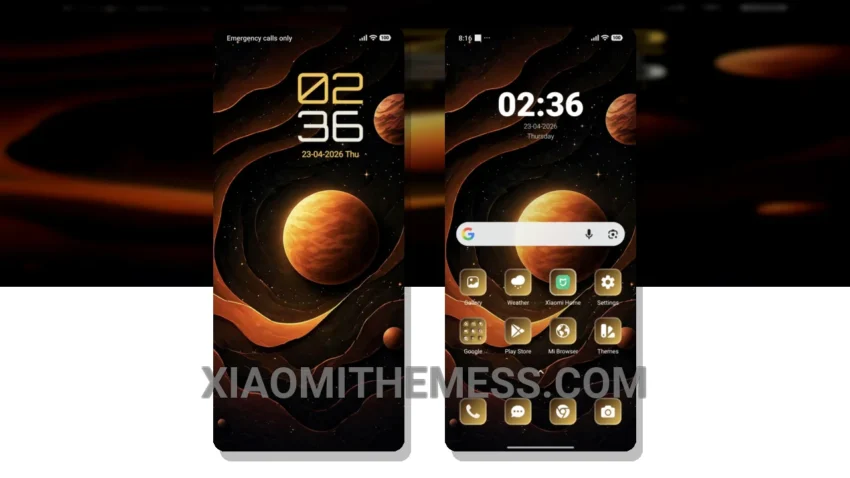
I love clean lines and pastel colors, so the Planet Pulse theme really caught my eye. This theme is all about simplicity and elegance, with a focus on creating a calm and aesthetic home screen.
The first thing I noticed about the Planet Pulse theme is its minimal vibe. The theme’s use of soft colors and simple shapes creates a very relaxing atmosphere, which is perfect for those who want a clutter-free home screen.
Compatibility and Performance
In terms of compatibility, the Planet Pulse theme is fully compatible with HyperOS, MIUI 12, MIUI 13, and MIUI 14, so it should work seamlessly on your Xiaomi or Redmi device.
The Planet Pulse theme has a lightweight design, which means it won’t slow down your device or cause any significant battery drain. Additionally, the theme’s dark mode optimization helps to reduce eye strain and conserve battery life.
However, one potential caveat of the Planet Pulse theme is that it may not be as feature-rich as some other themes on the market. Nevertheless, the theme’s simplicity and elegance make it a great choice for those who want a clean and easy-to-use interface.
Conclusion
To be honest, I’m really impressed with the Planet Pulse theme. The theme’s customization options are limited, but the default design is so well-done that I didn’t feel the need to make any changes. Overall, I would definitely recommend the Planet Pulse theme to anyone looking for a simple and elegant MIUI theme.
The Planet Pulse theme is a great example of how minimal vibrant design can create a beautiful and functional home screen. With its clean interface and pastel aesthetic, this theme is perfect for those who want a premium UI without the clutter.
Theme Information
🛠️ How to Install This MTZ Theme
- Download the MTZ file to your device.
- Open the official Themes app and go to your profile.
- Import & Apply the downloaded file.