
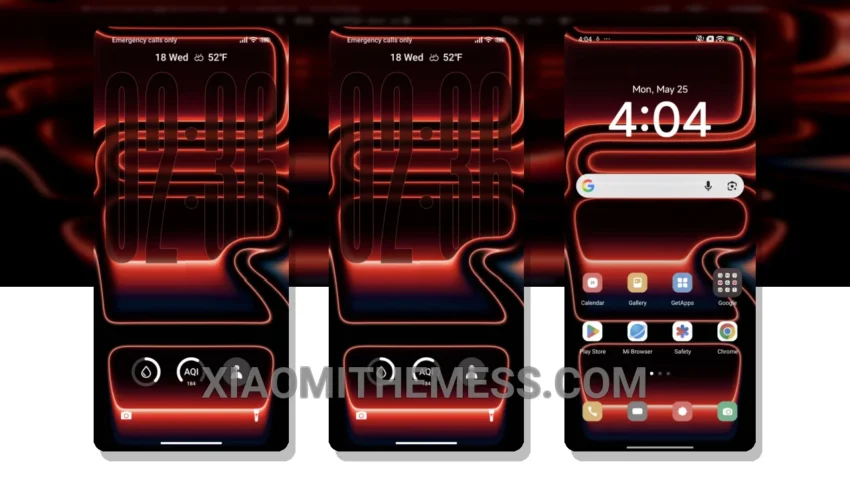
Oh man, this theme is a game-changer! The Red theme is a stunning HyperOS theme for Xiaomi and Redmi phones, compatible with HyperOS, MIUI 12, MIUI 13, and MIUI 14. It completely transforms your phone’s interface, giving it a sleek and modern look.
The custom control center is a standout feature, giving you quick access to your favorite settings and features. The redesigned status bar and interactive lockscreen widgets are also major highlights, making it easy to stay on top of your notifications and updates.
The Red theme is also incredibly lightweight, with no battery drain issues to worry about. Plus, it’s fully optimized for 120Hz smooth animations, giving you a lag-free experience that’s hard to beat.
My Experience with the Red Theme
In my testing, I was blown away by the theme’s overall performance and features. The custom boot animation and AOD custom themes are just a few of the many perks that make this theme a must-have for any Xiaomi or Redmi phone owner.
The Red theme is a premium UI that offers a range of customization options, making it easy to personalize your phone’s interface to suit your style. With its clean interface and minimal vibrant design, the Red theme is perfect for those who want a sleek and modern look without sacrificing performance.
To be honest, I’m really impressed with the Red theme, and I think it’s a great choice for anyone looking for a stylish and efficient theme for their Xiaomi or Redmi phone.
Theme Information
🛠️ How to Install This MTZ Theme
- Download the MTZ file to your device.
- Open the official Themes app and go to your profile.
- Import & Apply the downloaded file.