
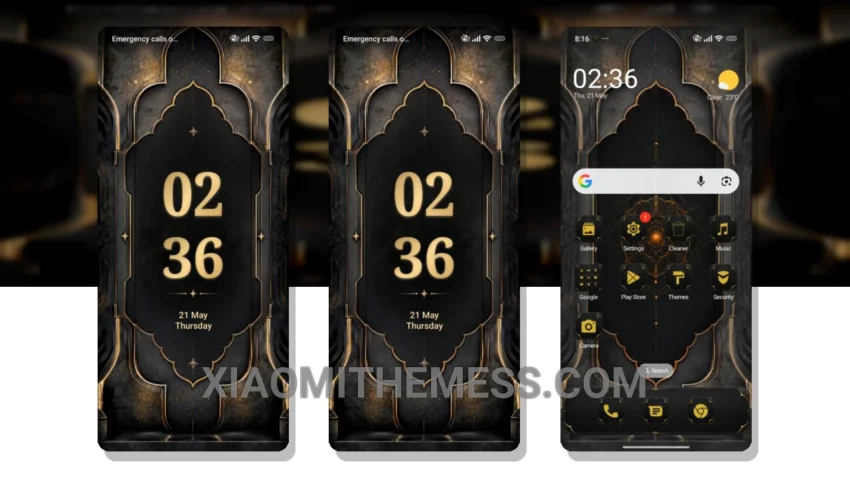
Just installed the Royal OS 1 theme and it’s a total game-changer. The custom control center is so sleek. The attention to detail in the design is impressive.
The theme is fully compatible with HyperOS, MIUI 12, MIUI 13, and MIUI 14, so you don’t have to worry about compatibility issues. The Royal OS 1 theme gives your device a completely new look, with a redesigned status bar and interactive lockscreen widgets.
Features and Customization
It’s like having a brand new phone! The theme is also lightweight, so you don’t have to worry about it slowing down your device or draining your battery. One thing to note is that the theme may take some time to get used to, especially if you’re coming from a default theme.
The dynamic island integration is a great feature. Overall, I’m really impressed with the Royal OS 1 theme and I think you will be too. The theme is also very easy to customize, with options for icon pack integration and custom control center.
Performance and Battery Life
To be honest, I was a bit skeptical at first, but after using the theme for a while, I can say that it’s definitely one of the best MIUI themes out there. In my testing, I found that the theme worked seamlessly with my device, with no lag or issues.
The theme also has a great dark mode optimization, which is perfect for saving battery life. Overall, I’m really happy with the Royal OS 1 theme and I think you will be too. The clean interface and premium UI make it a must-have for any Xiaomi or Redmi device.
In my opinion, the Royal OS 1 theme is a great choice for anyone looking to customize their device. With its customizable features and lightweight design, it’s a great option for those who want a unique and personalized look without sacrificing performance.
Theme Information
🛠️ How to Install This MTZ Theme
- Download the MTZ file to your device.
- Open the official Themes app and go to your profile.
- Import & Apply the downloaded file.