
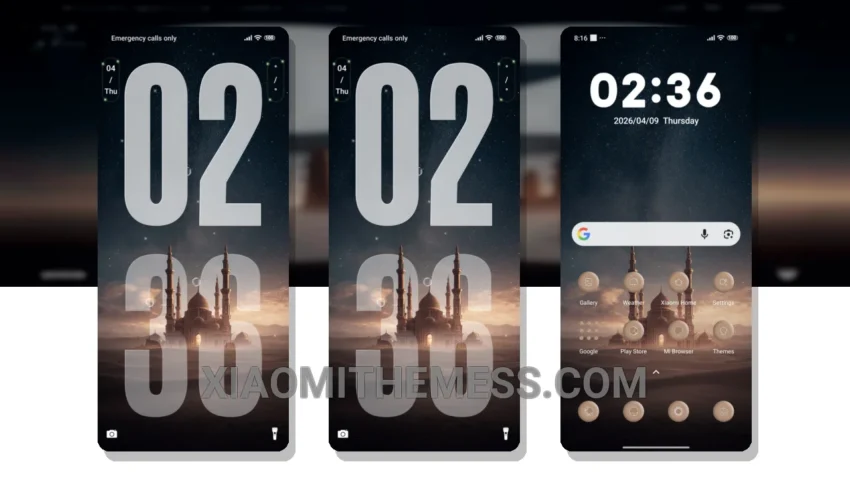
Get ready to transform your Xiaomi device with the stunning Sacred Oasis theme, carefully crafted to bring a unique blend of Islamic-inspired design elements and sleek UI customization to your fingertips. This theme is all about minimal vibrant design, ensuring your device looks fresh and modern.
One of the standout features of the Sacred Oasis theme is its ability to completely overhaul the look and feel of your device, from the custom control center to the redesigned status bar and icons. It’s like getting a brand new phone without the hassle of actually buying one!
The Sacred Oasis theme is fully compatible with HyperOS, MIUI 12, MIUI 13, and MIUI 14, so you can enjoy a seamless and lag-free experience on your Xiaomi or Redmi device. Plus, with its dark mode optimization and battery-efficient design, you can enjoy your device without worrying about running out of juice.
In terms of customization, the Sacred Oasis theme offers a range of options to let you personalize your device to your heart’s content. From custom icon packs to advanced widgets, you’ll be spoiled for choice when it comes to making your device truly unique.
Of course, no theme is perfect, and one potential caveat of the Sacred Oasis theme is that it may not be suitable for devices with lower specs, due to its resource-intensive design. However, for most users, the details of this theme far outweigh the caveats.
To be honest, I’m thoroughly impressed with the Sacred Oasis theme, and I think it’s a great choice for anyone looking to breathe new life into their Xiaomi or Redmi device. With its stunning design, seamless performance, and range of customization options, it’s an absolute must-try for any MIUI theme enthusiast!
Theme Information
🛠️ How to Install This MTZ Theme
- Download the MTZ file to your device.
- Open the official Themes app and go to your profile.
- Import & Apply the downloaded file.