
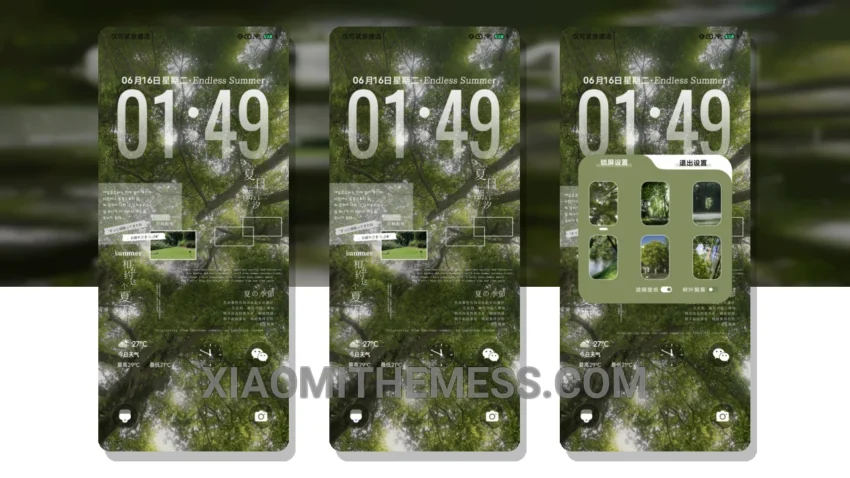
Dark mode, all the time. That’s my motto. And the Shallow Summer Appointment theme delivers. This beautiful, AMOLED-optimized theme is perfect for those who want to save battery life and reduce eye strain. With its unique, minimal vibrant twist, it’s a must-have for any Xiaomi or HyperOS user.
First impressions matter. And this theme makes a great one. The moment you apply it, you’ll notice the clean interface and elegant design. It’s not just about looks, though – the theme is also lag-free and provides a smooth, 120Hz experience.
One of the best things about this theme is its compatibility. It works seamlessly with HyperOS, MIUI 12, MIUI 13, and MIUI 14, so you can enjoy it regardless of your device or operating system. And with its custom control center and redesigned status bar, you’ll have everything you need at your fingertips.
But what really sets this theme apart is its attention to detail. From the interactive lockscreen widgets to the custom boot animation, every aspect of the theme has been carefully crafted to provide a premium UI experience. And with its support for icon pack integration and dynamic island integration, you can customize it to fit your unique style.
To be honest, I was blown away by the Shallow Summer Appointment theme. The way it balances form and function is impressive, and it’s clear that the designer put a lot of thought into creating a theme that’s both beautiful and functional. In my testing, I found that it performed flawlessly, with no battery drain or lag. If you’re looking for a theme that will elevate your Xiaomi or HyperOS experience, look no further.
Theme Information
🛠️ How to Install This MTZ Theme
- Download the MTZ file to your device.
- Open the official Themes app and go to your profile.
- Import & Apply the downloaded file.