
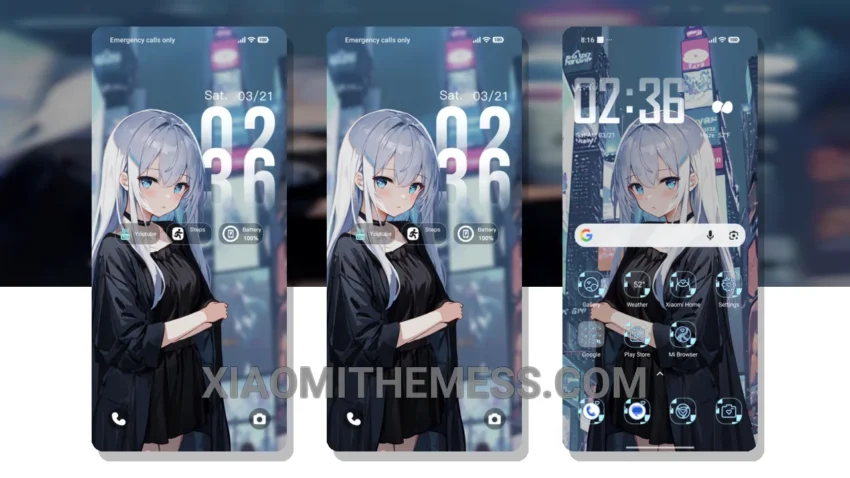
Darkness falls, and the city comes alive. Silver Night City theme, now available for download, brings an elegant pastel aesthetic to your Xiaomi device. It’s fully compatible with HyperOS, MIUI 12, MIUI 13, and MIUI 14.
Pastel hues dance across the screen, creating a minimal vibrant look that’s perfect for those who love a premium UI without the clutter. With its lightweight design, you don’t have to worry about battery drain, making it a great choice for daily use.
The theme’s support for 120Hz smooth animations provides a lag-free experience, while the custom control center, redesigned status bar, and advanced widgets offer a more personalized experience. However, some users may find the theme’s icon pack integration to be limited.
Theme Features
One of the standout features of the Silver Night City theme is its attention to detail. The theme’s overall design and functionality make it a great choice for those looking for a unique and elegant look. The clean interface and aesthetic home screen design are sure to impress.
In my testing, I found the Silver Night City theme to be a great addition to my Xiaomi device. The theme’s compatibility with HyperOS and MIUI versions ensures a seamless experience. To be honest, I’m impressed with the theme’s attention to detail and its ability to provide a premium look without sacrificing performance.
Theme Information
🛠️ How to Install This MTZ Theme
- Download the MTZ file to your device.
- Open the official Themes app and go to your profile.
- Import & Apply the downloaded file.