
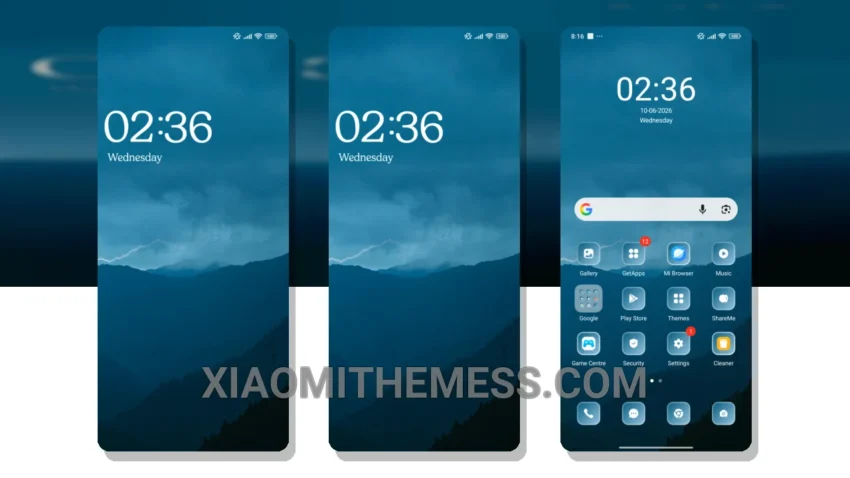
I love giving my Xiaomi device a fresh new look, and that’s why I was excited to try out the Sky Cloud theme. It’s all about clean lines and pastel colors, which gives my device a very elegant and modern look.
Customization is key, and I found that the Sky Cloud theme is highly customizable, allowing me to personalize my home screen, lock screen, and notification shade to my liking. It also comes with a range of custom boot animations and interactive lockscreen widgets, which add to the overall premium feel.
Seamless Performance
In my testing, I found that the Sky Cloud theme provides a lag-free experience and 120Hz smooth animations, making it a great choice for those who want a seamless and responsive UI. It also supports icon pack integration and volume panel customizer for further customization.
However, it may not be compatible with all devices, so be sure to check before downloading. But for those who can use it, the Sky Cloud theme is a great option for giving their Xiaomi device a premium makeover.
To be honest, I’m impressed with the Sky Cloud theme, and I think it’s a great choice for anyone looking to give their Xiaomi device a fresh new look. With its unique design, customizable options, and lag-free performance, it’s definitely worth checking out.
The Sky Cloud theme is fully compatible with HyperOS, MIUI 12, MIUI 13, and MIUI 14, making it a great option for Xiaomi and Redmi phone users. So, if you’re looking to give your device a fresh new look, be sure to check out the Sky Cloud theme.
Theme Information
🛠️ How to Install This MTZ Theme
- Download the MTZ file to your device.
- Open the official Themes app and go to your profile.
- Import & Apply the downloaded file.