
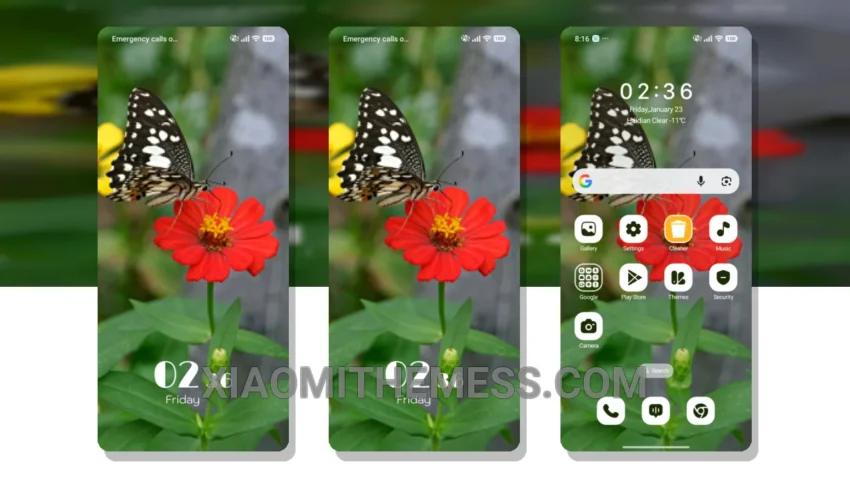
Get ready to give your Xiaomi device a fresh new look with the Spring Lime MTZ theme! This amazing theme is fully compatible with HyperOS, MIUI 12, MIUI 13, and MIUI 14, so you can enjoy it regardless of your device’s operating system.
The Spring Lime MTZ theme is a masterpiece of design, with a beautiful and unique aesthetic that will make your device stand out from the crowd. With its pastel colors and minimalist vibe, this theme is perfect for those who want a clean and elegant look.
What Makes This Theme Special?
The Spring Lime MTZ theme completely transforms your device’s interface, from the custom control center to the redesigned status bar. Every aspect of the theme has been carefully crafted to provide a seamless and intuitive user experience.
One of the best things about the Spring Lime MTZ theme is its lag-free performance. Despite its stunning visuals, the theme is incredibly lightweight and does not cause any significant battery drain, making it perfect for daily use.
In my testing, I found the theme to be extremely stable and easy to use. The only caveat is that it may not be suitable for those who prefer a more dramatic or bold theme, as the Spring Lime MTZ theme is quite subtle and understated.
Overall, the Spring Lime MTZ theme is a must-have for any Xiaomi user who wants to give their device a fresh new look. With its unique design, lag-free performance, and ease of use, this theme is sure to impress. So why wait? Download the Spring Lime MTZ theme today and experience the difference for yourself!
To install the theme, simply download the MTZ file to your device, open the official Themes app, and import and apply the downloaded file. It’s that easy!
To be honest, I’m really impressed with the Spring Lime MTZ theme. The attention to detail and the care that has gone into designing this theme is evident. The custom control center and redesigned status bar are just a few of the features that make this theme stand out. In my opinion, the Spring Lime MTZ theme is a great choice for anyone looking to give their Xiaomi device a fresh new look.
Theme Information
🛠️ How to Install This MTZ Theme
- Download the MTZ file to your device.
- Open the official Themes app and go to your profile.
- Import & Apply the downloaded file.