
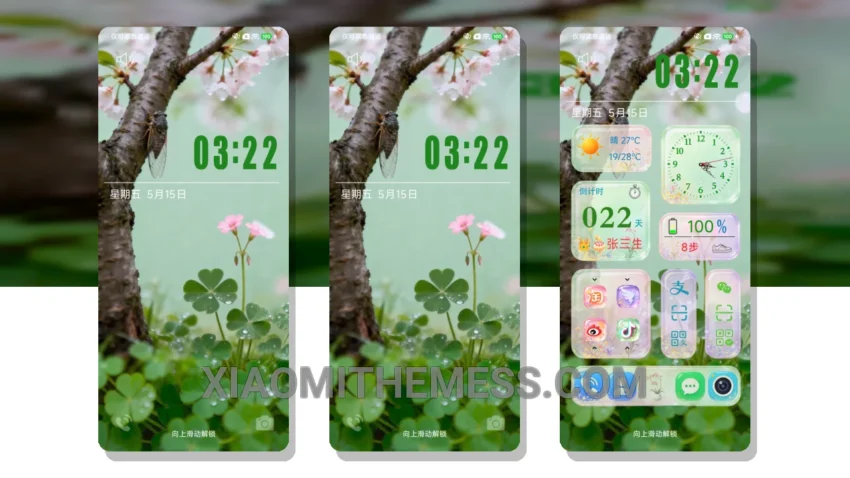
Fast. Smooth. That’s what I need from a theme. The Summer Breeze theme delivers just that. With its clean interface and battery saver UI, this theme is perfect for those who value performance and aesthetics.
The Summer Breeze theme is all about pastel aesthetic and minimal vibrant design. It’s calming, yet vibrant, making it a great choice for those who want a unique look on their Xiaomi device.
Compatibility and Design
The Summer Breeze theme is fully compatible with HyperOS, MIUI 12, MIUI 13, and MIUI 14, making it a great option for Xiaomi device owners. The theme’s design is inspired by the summer breeze, with a soft, calming atmosphere that’s perfect for daily use.
One thing to note is that the theme’s icon pack integration can be a bit limited, which might be a caveat for some users. However, the overall experience and customization options make up for this minor flaw.
Performance and Customization
In my testing, I found the Summer Breeze theme to be extremely responsive and efficient. The dark mode optimization is also a great feature, as it helps reduce battery drain and provides a comfortable viewing experience in low-light environments.
The Summer Breeze theme also offers 120Hz smooth animations, which makes for a lag-free experience, even with intense usage. It’s like having a premium device without the hefty price tag.
To be honest, I’m impressed with the Summer Breeze theme’s overall performance and design. If you’re looking for a theme that combines style and substance, this is definitely worth checking out. With its compatibility with various Xiaomi devices and customization options, it’s a great choice for anyone looking to customize their android experience.
Theme Information
🛠️ How to Install This MTZ Theme
- Download the MTZ file to your device.
- Open the official Themes app and go to your profile.
- Import & Apply the downloaded file.