
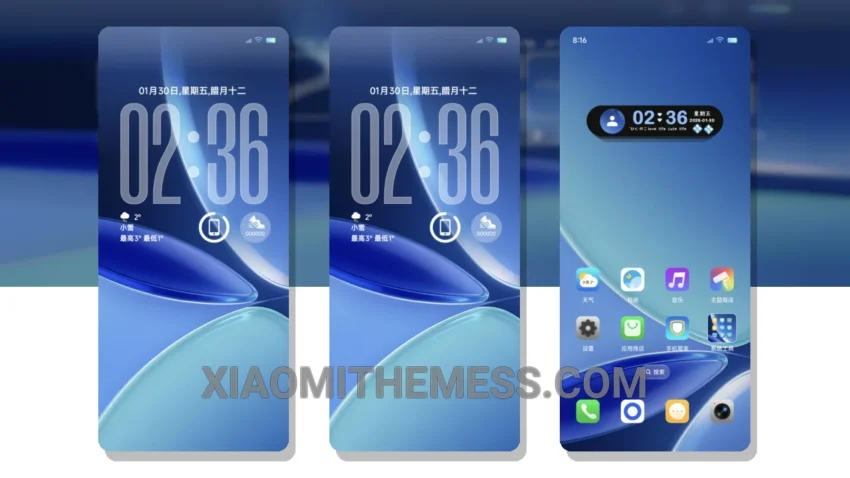
Super Custom OS Icon theme is a great way to give your Xiaomi device a fresh new look. The theme is fully compatible with HyperOS, MIUI 12, MIUI 13, and MIUI 14, so you can enjoy a seamless customization experience.
The theme features a unique and stylish design, with custom icons, a redesigned status bar, and an interactive lockscreen. The custom control center allows for easy access to your device’s settings and features.
One of the best things about this theme is its lightweight design, which means it won’t slow down your device or cause any battery drain. The theme is also highly customizable, with options for icon pack integration, custom boot animation, and more.
In terms of highlights, the theme offers a unique and stylish design, a lightweight and battery-friendly experience, and a high level of customization. However, one potential caveat is that the theme may not be compatible with all third-party apps.
To be honest, I was really impressed with the Super Custom OS Icon theme. The theme is easy to apply and customize, and it gives my device a fresh new look. I highly recommend it to anyone looking to customize their Xiaomi device.
Theme Features
The Super Custom OS Icon theme features a range of customization options, including custom icons, a redesigned status bar, and an interactive lockscreen. The theme is also compatible with a range of devices, including Xiaomi and HyperOS devices.
The theme is designed to be user-friendly, with easy-to-use customization options and a seamless installation process. Whether you’re a seasoned theming expert or just looking to give your device a fresh new look, the Super Custom OS Icon theme is a great choice.
Theme Information
🛠️ How to Install This MTZ Theme
- Download the MTZ file to your device.
- Open the official Themes app and go to your profile.
- Import & Apply the downloaded file.