
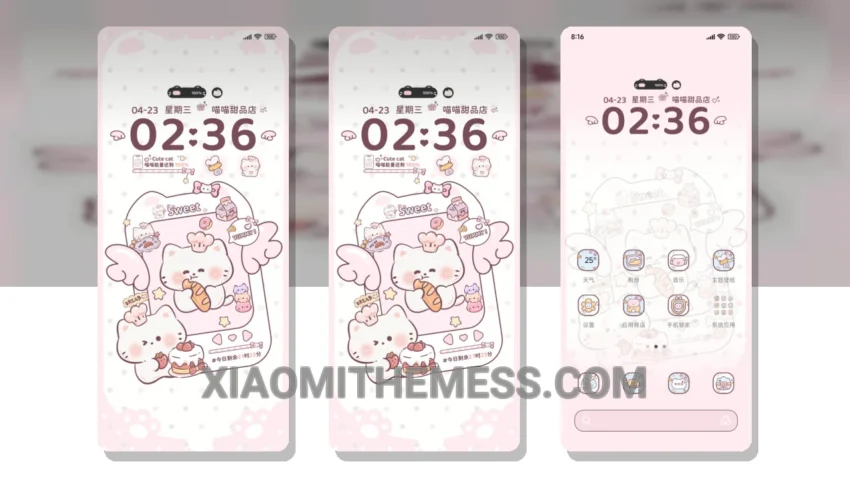
Sweet and simple. That’s what I love about the Sweet Whiskers Dessert Shop theme. It’s a breath of fresh air, with its minimal pastel colors and clean lines. This theme is perfect for those who appreciate elegance and simplicity.
The theme’s compatibility is a major plus. It works seamlessly with HyperOS, MIUI 12, MIUI 13, and MIUI 14, so you can enjoy it regardless of your device’s operating system. The theme’s size is also relatively small, at 13.55 MB, making it easy to download and install.
One of the best things about this theme is its dark mode optimization. It provides a clean and minimal aesthetic that’s easy on the eyes. The theme also supports various android customization apps and icon packs, so you can further personalize your device to your liking.
I love how the theme’s pastel colors give my device a unique and playful touch. The overall design is very aesthetic and pleasing to the eye. However, some users may find the theme’s simplicity a bit too minimal, and wish for more customization options.
The theme’s compatibility with android customization apps is a major highlight. You can use apps like android launcher and icon packs to further customize your device. The theme also supports features like 120Hz smooth animations and lag-free experience, making it a great choice for those who want a seamless user experience.
In my testing, I found the theme to be very stable and efficient. It didn’t cause any battery drain or performance issues, making it a great choice for daily use. To be honest, I’m really impressed with the Sweet Whiskers Dessert Shop theme, and I think it’s a great option for anyone looking for a minimal and elegant theme for their Xiaomi device.
Theme Information
🛠️ How to Install This MTZ Theme
- Download the MTZ file to your device.
- Open the official Themes app and go to your profile.
- Import & Apply the downloaded file.