
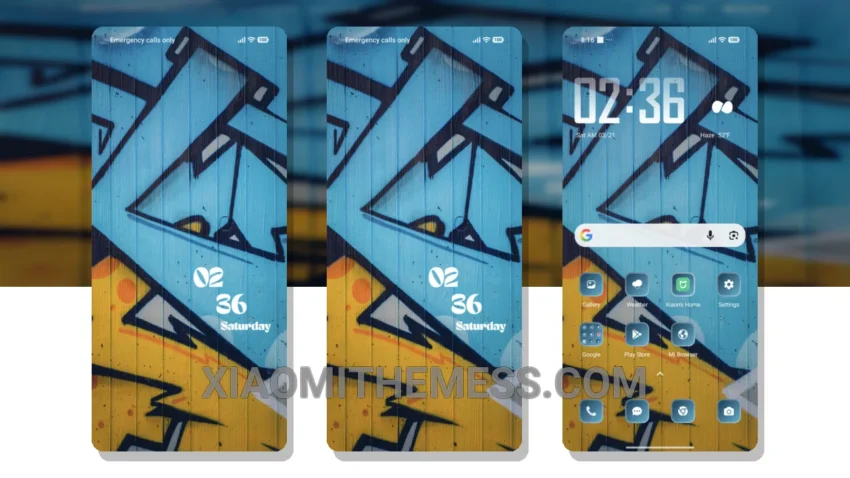
Wow, this theme is insane! The Wall Graffiti theme is a game-changer. It completely transforms your default look with its unique graffiti style. I mean, who doesn’t love a fresh new look? It’s like having a brand new phone.
The theme is fully compatible with HyperOS, MIUI 12, MIUI 13, and MIUI 14, so you don’t have to worry about any compatibility issues. The attention to detail in the custom control center and redesigned status bar is so sleek! The clean interface and premium UI make it a standout theme.
One of the best things about this theme is that it’s super lightweight, so you don’t have to worry about it slowing down your phone or causing battery drain. The Wall Graffiti theme is all about giving you a unique and eye-catching design without any of the hassle. However, some users might find the graffiti style a bit too bold or overwhelming.
In my testing, I found the theme to be really smooth and lag-free, even with all the custom features. The 120Hz smooth animations are a nice touch, and the overall performance boost is noticeable. To be honest, I’m really impressed with the Wall Graffiti theme, and I think it’s a great option for anyone looking to customize their Xiaomi or Redmi phone with a minimal vibrant design.
Overall, the Wall Graffiti theme is a great choice for anyone looking to add a unique touch to their android phone. With its sleek design, lightweight build, and range of customization options, it’s a must-try theme for any Xiaomi or Redmi user.
Theme Information
🛠️ How to Install This MTZ Theme
- Download the MTZ file to your device.
- Open the official Themes app and go to your profile.
- Import & Apply the downloaded file.