
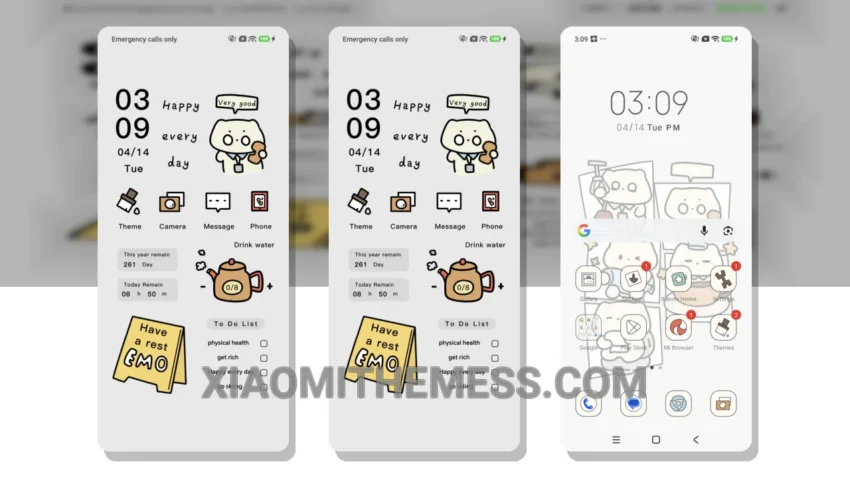
Love at first sight. That’s what I felt when I saw the Work Kitty theme. It’s a great Xiaomi theme that translates to ‘Working Kitten’ in English, giving your device a fresh and cute look.
Simple. Elegant. Pastel colors. These are the first things that come to mind when I think of the Work Kitty theme. It’s fully compatible with HyperOS, MIUI 12, MIUI 13, and MIUI 14, so you don’t have to worry about any compatibility issues.
One of the best things about this theme is its clean interface. The aesthetic home screen is beautifully designed, with a custom control center and redesigned status bar that makes it easy to navigate. Plus, it’s a lag-free experience, thanks to its lightweight design and system optimization.
While the theme is great overall, one thing to note is that it may not be suitable for those who prefer a dark mode optimization, as it’s more focused on a pastel aesthetic. However, for those who love a minimal vibrant look, this theme is a must-try.
In my testing, I found the theme to be very smooth, with 120Hz smooth animations that make it a joy to use. The custom boot animation and AOD custom themes are also a nice touch, adding to the overall premium UI feel of the theme.
Conclusion
To be honest, I’m really impressed with the Work Kitty theme. It’s a great choice for anyone looking for a cute and elegant theme that’s also lightweight and lag-free. I highly recommend giving it a try if you’re looking to customize your android phone with a unique and aesthetic theme.
Theme Information
🛠️ How to Install This MTZ Theme
- Download the MTZ file to your device.
- Open the official Themes app and go to your profile.
- Import & Apply the downloaded file.