
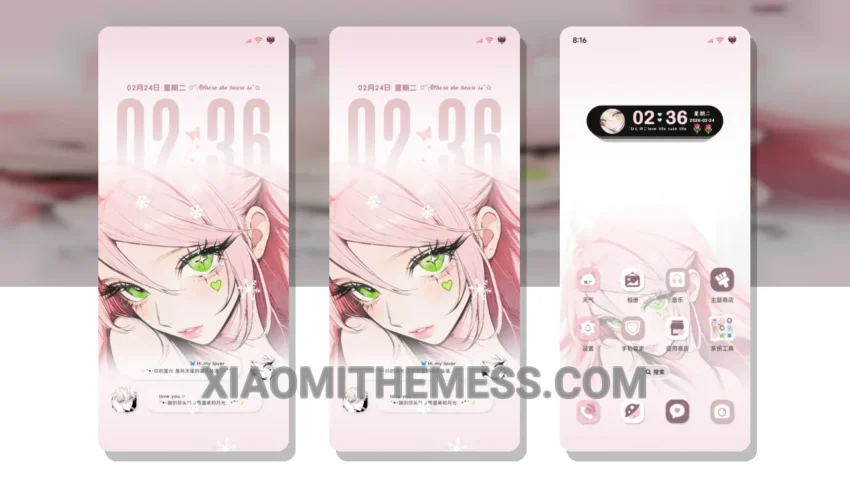
Get ready to revolutionize your Xiaomi phone’s look with the stunning Heartbeat Grid theme. It changes the control center, status bar, and icons, giving your phone a completely fresh look.
The Heartbeat Grid theme is a game-changer, transforming your device into a unique piece of art. Its lightweight design ensures a lag-free experience and no battery drain. This is especially important for those who value performance boost and system optimization.
The theme offers a range of customization features, including a custom control center, redesigned status bar, and icon pack integration. The custom boot animation feature lets you personalize your device even further. With its clean interface and premium UI, the Heartbeat Grid theme is a great choice for those who want to give their phone a fresh new look.
One thing to note is that the theme’s neon icons may not be to everyone’s taste. However, the Heartbeat Grid theme is a fantastic choice for those who want to give their Xiaomi phone a unique and stylish look. In terms of compatibility, the theme is fully compatible with HyperOS, MIUI 12, MIUI 13, and MIUI 14, making it a great option for a wide range of devices.
In my testing, I found the theme to be incredibly smooth, with 120Hz smooth animations that make navigating a breeze. The Glassmorphism UI and pastel aesthetic themes also add a touch of elegance to the overall design. To be honest, I’m thoroughly impressed with the Heartbeat Grid theme, and I think it’s a must-try for any Xiaomi or Redmi phone user.
The theme’s interactive lockscreen widgets and custom boot animation features take the customization to the next level. With its clean interface and premium UI, the Heartbeat Grid theme is a great choice for those who want to give their phone a fresh new look.
Theme Information
🛠️ How to Install This MTZ Theme
- Download the MTZ file to your device.
- Open the official Themes app and go to your profile.
- Import & Apply the downloaded file.