
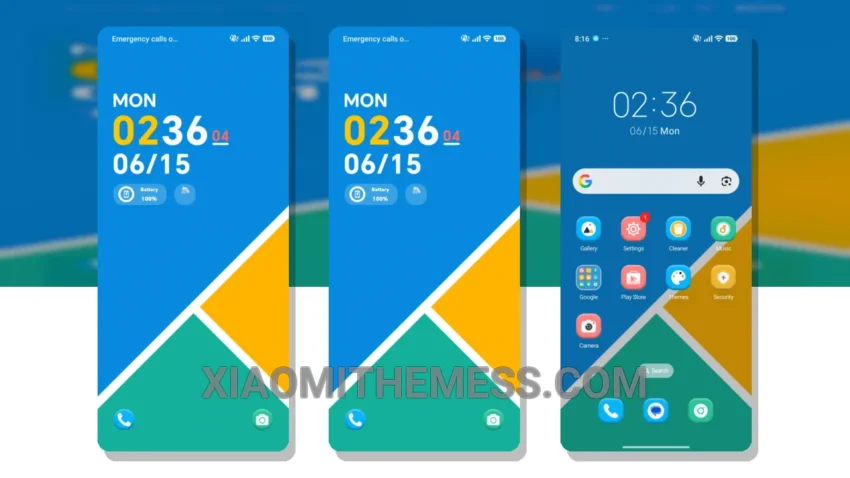
The Vibrant Sport Tale MTZ theme is a great choice for Xiaomi and HyperOS users. It offers a clean interface and a minimal vibrant design. The theme is fully compatible with HyperOS, MIUI 12, MIUI 13, and MIUI 14, making it a great option for users with different devices.
One of the details of this theme is its ability to provide a lag-free experience with 120Hz smooth animations. The theme also supports dark mode optimization for a premium UI experience. However, some users may find the theme’s design to be a bit too simple.
To apply the MTZ theme, simply download the theme file and go to the theme store on your device. Select the downloaded file to apply the theme. The theme is 4.76 MB in size, making it a relatively small download.
The Vibrant Sport Tale MTZ theme is a great option for users who want a clean and simple design. It offers a range of features, including support for custom control center and redesigned status bar. The theme is also compatible with Redmi devices running MIUI 12, 13, or 14.
In my testing, I found the theme to be very easy to use and navigate. The theme’s design is well-suited for daily use, and the custom boot animation is a nice touch. Overall, I would recommend the Vibrant Sport Tale MTZ theme to anyone looking for a clean and simple design with a range of features.
Theme Information
🛠️ How to Install This MTZ Theme
- Download the MTZ file to your device.
- Open the official Themes app and go to your profile.
- Import & Apply the downloaded file.