
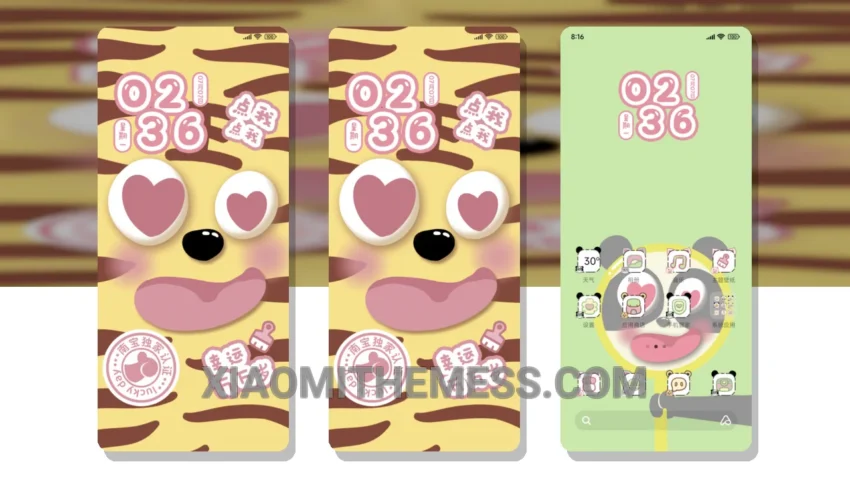
Big face animals, who is it? This question is answered with a visually stunning theme that brings a pastel aesthetic to your Xiaomi phone. With its beautiful design, this theme is sure to delight anyone who loves customization.
The Whose Face Is It theme is a great example of how a well-designed theme can completely change the look and feel of your phone. From the custom control center to the redesigned status bar, every aspect of this theme has been carefully crafted to provide a unique and premium UI experience.
One of the best things about this theme is its compatibility. It is fully compatible with HyperOS, MIUI 12, MIUI 13, and MIUI 14, making it a great choice for anyone with a Xiaomi phone. The theme is also very easy to apply, and it does not require any special permissions or root access.
In terms of customization options, the Whose Face Is It theme offers a lot of flexibility. You can customize the theme with your favorite icon packs, and you can also adjust the theme’s settings to suit your preferences. The theme also supports dynamic island integration, which allows you to customize your phone’s lock screen with interactive widgets.
Overall, the Whose Face Is It theme is a great choice for anyone who wants to customize their Xiaomi phone with a beautiful and unique theme. With its pastel aesthetic, custom control center, and redesigned status bar, this theme is sure to provide a premium UI experience that will make your phone stand out from the crowd.
To be honest, I was really impressed with the Whose Face Is It theme when I first saw it. The theme’s design is very unique and visually stunning, and it has a lot of customization options that allow you to personalize your phone to suit your preferences. In my testing, I found the theme to be very stable and smooth, with no lag or battery drain issues.
Theme Information
🛠️ How to Install This MTZ Theme
- Download the MTZ file to your device.
- Open the official Themes app and go to your profile.
- Import & Apply the downloaded file.