
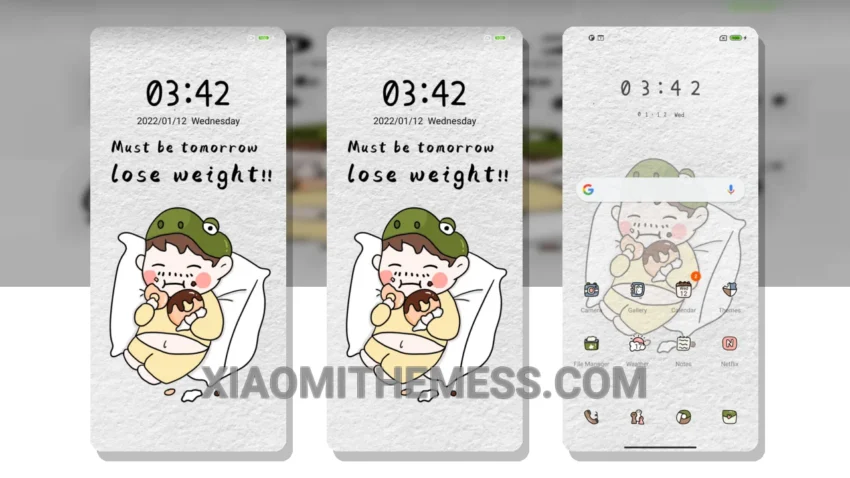
The Cute Life theme is a great option for those who love pastel aesthetic themes. It’s simple, elegant, and easy to navigate. What really stands out is its clean interface and minimal vibrant design. This theme is perfect for those who want a premium UI without the clutter.
I love how the theme’s designer has paid attention to detail, from the custom control center to the redesigned status bar. The advanced widgets and interactive lockscreen widgets are also a great touch. The theme is fully compatible with HyperOS, MIUI 12, MIUI 13, and MIUI 14, making it a great option for Xiaomi and Redmi device users.
One thing to note is that the theme may not be suitable for those who prefer a more cyberpunk aesthetic or neon icons. However, for those who love a clean and simple design, the Cute Life theme is a great choice. The theme’s compatibility with android customization apps also makes it a great option for those who want to customize their device further.
In terms of performance, the Cute Life theme is lag-free and doesn’t drain the battery. The theme’s dark mode optimization is also a great feature, making it perfect for those who want to save battery life. Overall, the Cute Life theme is a great option for those who want a simple, elegant, and customizable theme for their Xiaomi or Redmi device.
To be honest, I’m really impressed with the Cute Life theme. The attention to detail and the clean design make it a great option for those who want a premium UI without the clutter. In my testing, the theme performed well and didn’t drain the battery. If you’re looking for a great MIUI theme for your Xiaomi or Redmi device, I would definitely recommend the Cute Life theme.
Theme Information
🛠️ How to Install This MTZ Theme
- Download the MTZ file to your device.
- Open the official Themes app and go to your profile.
- Import & Apply the downloaded file.