
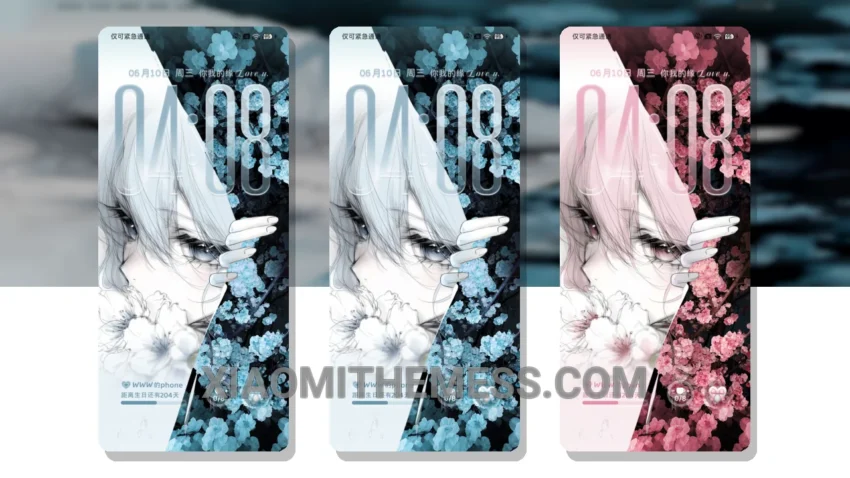
Fragile Love Atmosphere, a theme that screams elegance. It’s a game-changer for Xiaomi devices. This theme is fully compatible with HyperOS, MIUI 12, MIUI 13, and MIUI 14.
One of the best things about this theme is its custom control center. It’s sleek, it’s modern, and it’s a huge departure from the default look. The status bar has also been redesigned, giving your device a fresh new feel.
The Fragile Love Atmosphere MTZ theme is a great choice for those looking for a unique and customizable interface. With its interactive lockscreen widgets and custom boot animation, this theme is sure to impress. Plus, it’s a lightweight theme, so you don’t have to worry about it slowing down your device.
In terms of customization, this theme offers a lot of options. You can customize the look and feel of your device to fit your personal style. And, with its support for android customization apps, you can take your customization to the next level.
However, some users may find that the theme’s dark mode optimization could be improved. But overall, the Fragile Love Atmosphere MTZ theme is a great choice for anyone looking to give their Xiaomi device a unique and personalized look.
To be honest, I was blown away by the Fragile Love Atmosphere MTZ theme. The attention to detail is impressive, and the customization options are endless. In my testing, I found the theme to be smooth and lag-free, with no noticeable battery drain. If you’re looking for a new theme for your Xiaomi device, I highly recommend giving the Fragile Love Atmosphere MTZ theme a try.
Theme Information
🛠️ How to Install This MTZ Theme
- Download the MTZ file to your device.
- Open the official Themes app and go to your profile.
- Import & Apply the downloaded file.