
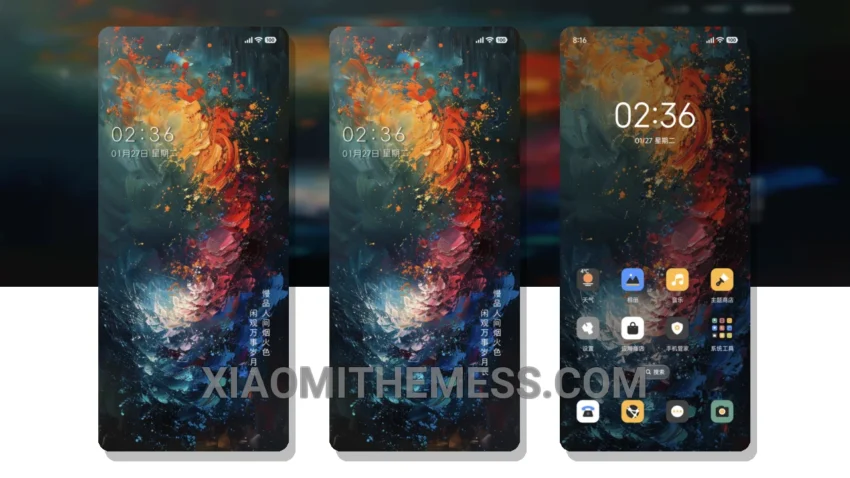
The Ink Splash Business MTZ theme is a great way to give your Xiaomi device a fresh new look. This theme is fully compatible with HyperOS, MIUI 12, MIUI 13, MIUI 14, and Redmi devices.
One of the best things about this theme is its unique design, which will make your device stand out from the crowd. The ink splash effect is really cool, and it’s something that you won’t find in many other themes.
The Ink Splash Business theme also supports dark mode optimization, which is great for saving battery life and reducing eye strain. The theme is also very lightweight, so it won’t slow down your device.
In terms of customization, the Ink Splash Business theme allows you to personalize your control center and status bar. You can also customize the icons and the overall look and feel of your device.
However, one thing to note is that the theme can be a bit resource-intensive, which may cause some lag on lower-end devices. But overall, the Ink Splash Business MTZ theme is a great choice for anyone looking to give their Xiaomi device a unique and premium look.
To be honest, I’m really impressed with the Ink Splash Business theme, and I think it’s a great option for anyone looking to customize their Xiaomi device. The theme is easy to apply, and it’s fully compatible with a range of devices, including HyperOS, MIUI 12, MIUI 13, MIUI 14, and Redmi devices.
Theme Information
🛠️ How to Install This MTZ Theme
- Download the MTZ file to your device.
- Open the official Themes app and go to your profile.
- Import & Apply the downloaded file.