
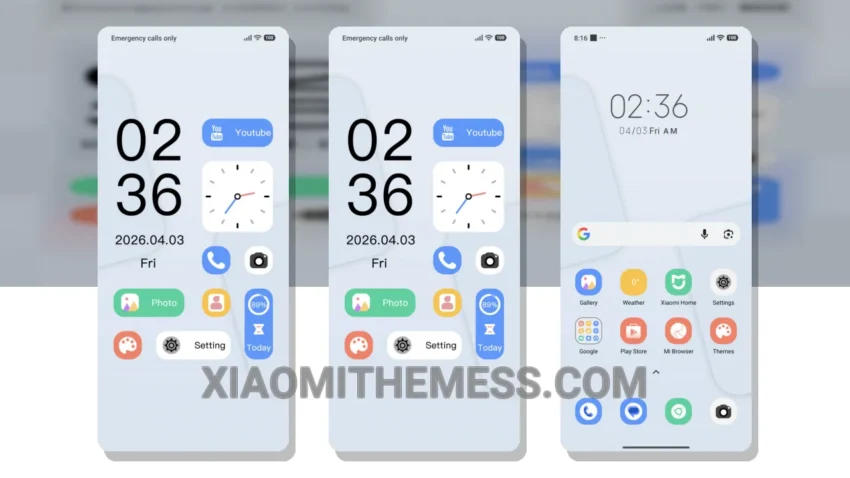
Dark mode is my thing. I mean, who needs bright, harsh lights when you can have a sleek, dark interface that’s easy on the eyes? The Lite Blue Summer theme delivers just that – a unique blend of soft pastel colors and dark mode optimization that’s perfect for Xiaomi devices.
It’s a great Xiaomi theme, fully compatible with HyperOS, MIUI 12, MIUI 13, and MIUI 14. The theme title, Lite Blue Summer, translates to a catchy English name that reflects its aesthetic. With a size of 4.12 MB, it’s a lightweight theme that won’t drain your battery.
I love how the theme’s minimal design provides a clean interface, making it easy to navigate and find what you need. The use of pastel colors adds a touch of elegance, while the dark mode optimization ensures that your device’s battery life is preserved. Plus, the theme’s compatibility with android customization apps means you can personalize it to your heart’s content.
One of the highlights of this theme is its ability to provide a seamless, lag-free experience. The 120Hz smooth animations make scrolling and navigating a breeze. However, some users might find the theme’s icon pack integration to be a bit limited. To be honest, I think the details far outweigh the caveats – the Lite Blue Summer theme is a must-have for anyone looking for a stylish and functional HyperOS theme.
In my testing, I found the theme to be highly responsive, with no noticeable lag or performance issues. The system optimization is top-notch, providing a performance boost that’s hard to ignore. Whether you’re a fan of cyberpunk aesthetic or just looking for a clean and minimal theme, the Lite Blue Summer theme is definitely worth checking out.
So, if you’re looking for a theme that’s both stylish and functional, look no further than the Lite Blue Summer theme. With its unique blend of dark mode optimization, minimal design, and pastel colors, it’s the perfect choice for anyone looking to customize their Xiaomi device.
Theme Information
🛠️ How to Install This MTZ Theme
- Download the MTZ file to your device.
- Open the official Themes app and go to your profile.
- Import & Apply the downloaded file.