
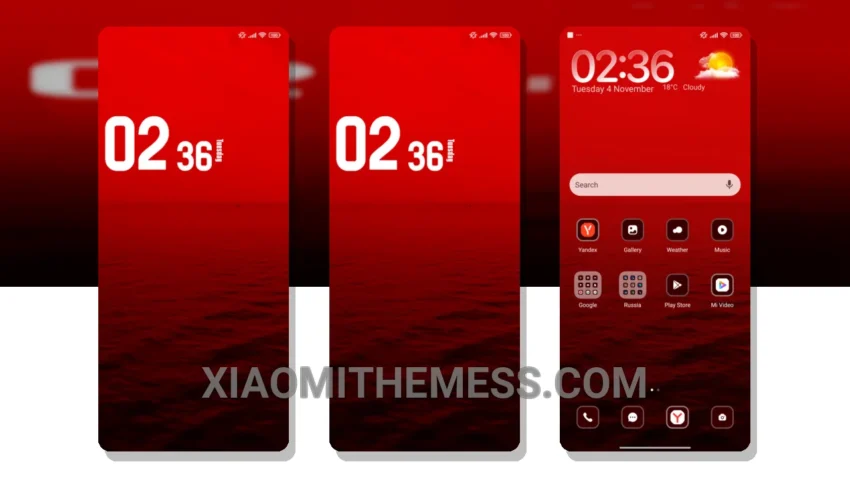
Flashing custom ROMs is my thing, but a good theme can make all the difference. I stumbled upon the Red Water theme and I’m hooked. The clean interface and the way it makes my Xiaomi look like an iPhone is amazing.
The theme is compatible with HyperOS, MIUI 12, MIUI 13, and MIUI 14, so you don’t have to worry about compatibility issues. Tinkering with the theme settings, I found that it’s pretty easy to customize the control center and status bar.
I love how the Red Water theme integrates with custom boot animation and AOD custom themes. It’s a small touch, but it makes a big difference in the overall user experience. The theme’s ability to transform my Xiaomi into an iPhone lookalike with a premium UI is impressive.
One thing to note is that the theme can be a bit slow to apply, especially if you have a lot of widgets and icons on your home screen. But overall, the Red Water theme is a great choice for anyone looking to give their Xiaomi a premium look.
In my testing, I found that the theme works seamlessly with icon pack integration and volume panel customizer. The Red Water theme is definitely a great addition to my collection of themes. To be honest, I’m impressed with the level of customization it offers, and I think you will be too.
Conclusion
The Red Water theme is a must-try for any Xiaomi user looking to give their phone a unique and premium look. With its clean interface, customizable control center and status bar, and seamless integration with custom boot animation and AOD custom themes, this theme is sure to impress.
Theme Information
🛠️ How to Install This MTZ Theme
- Download the MTZ file to your device.
- Open the official Themes app and go to your profile.
- Import & Apply the downloaded file.