
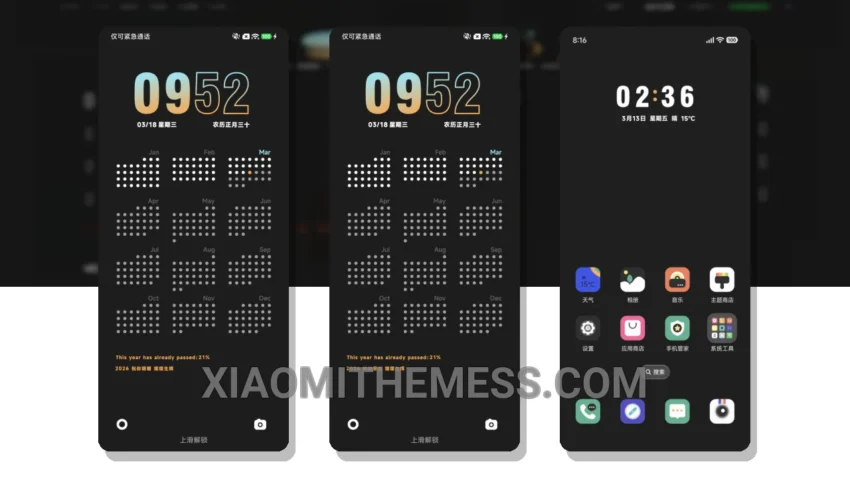
Dark mode is where it’s at. I mean, who needs a bright, eye-searing interface when you can have a sleek and minimalistic design that’s easy on the eyes? The Minimal Calendar theme is a great example of this, with its clean lines, simple typography, and of course, a gorgeous dark mode that’s perfect for saving battery life.
The Minimal Calendar theme is fully compatible with HyperOS, MIUI 12, MIUI 13, and MIUI 14, so you can enjoy it on a range of Xiaomi devices. And with its lightweight design, you don’t have to worry about it slowing down your phone or draining the battery.
Attention to Detail
One of the best things about the Minimal Calendar theme is its attention to detail. From the subtle animations to the clever use of whitespace, every element of the theme has been carefully crafted to create a seamless and intuitive user experience. And with a range of customization options, you can tailor the theme to suit your personal style.
In my testing, I found the Minimal Calendar theme to be fast, responsive, and extremely easy to use. The dark mode is particularly well-implemented, with a deep, rich color that’s perfect for reading and browsing. And with the theme’s minimalistic design, you can enjoy a clean and clutter-free interface that’s free from distractions.
To be honest, I’m really impressed with the Minimal Calendar theme. It’s a great example of how a simple, well-designed theme can elevate the overall user experience of a device. And with its compatibility with a range of Xiaomi devices, it’s a great option for anyone looking to give their phone a fresh new look.
The Minimal Calendar theme also offers a range of details, including a clean interface, premium UI, and aesthetic home screen. Overall, I’m really happy with the Minimal Calendar theme and I think you will be too.
Theme Information
🛠️ How to Install This MTZ Theme
- Download the MTZ file to your device.
- Open the official Themes app and go to your profile.
- Import & Apply the downloaded file.