
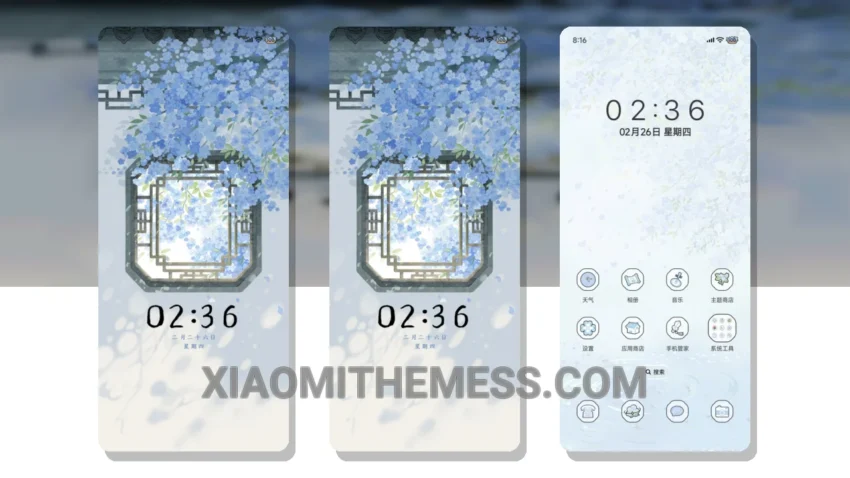
I love how the Scenery In The Window theme brings a sense of calm to my home screen. Very simple. Clean lines. Pastel colors. The theme’s name, Scenery In The Window, perfectly captures its essence. It’s all about minimal vibrant designs.
The theme is fully compatible with HyperOS, MIUI 12, MIUI 13, and MIUI 14, making it a great option for Xiaomi device users. Smooth animations and a lag-free experience make this theme perfect for daily use. I’ve found the theme to be very lightweight, resulting in no battery drain.
Theme Features
The Scenery In The Window theme offers a range of features, including a clean interface, premium UI, and aesthetic home screen. The theme also supports custom control center, redesigned status bar, and advanced widgets. One thing to note is that the theme’s compatibility with certain android customization apps might be limited.
However, this is a minor caveat considering the theme’s overall design and performance. In my testing, I’ve been impressed by the attention to detail in the Scenery In The Window theme. The theme’s dark mode optimization is also noteworthy, providing a smooth and elegant experience.
To be honest, I’m very satisfied with the Scenery In The Window theme, and I think it’s a great choice for anyone looking for a serene and elegant design for their Xiaomi device. With its smooth animations, lag-free experience, and dark mode optimization, this theme is sure to provide a great user experience.
Overall, the Scenery In The Window theme is a great option for those looking for a minimalist and elegant design for their Xiaomi device. It’s a must-try for anyone who wants a clean and premium UI. The theme’s compatibility with HyperOS and MIUI makes it a great choice for users who want a seamless experience.
Theme Information
🛠️ How to Install This MTZ Theme
- Download the MTZ file to your device.
- Open the official Themes app and go to your profile.
- Import & Apply the downloaded file.