
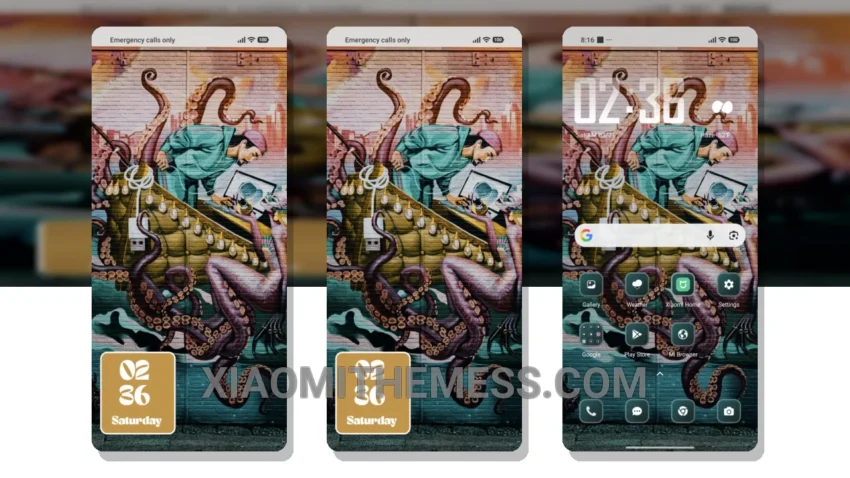
Wow, this theme is a game-changer! The Street Art theme is a must-have for anyone looking to give their Xiaomi device a unique urban twist. With its vibrant colors and bold designs, this theme is sure to turn heads.
The attention to detail in the Street Art theme is impressive. From the custom control center to the redesigned status bar, every aspect of the theme has been carefully crafted to provide a seamless user experience.
The Street Art theme is fully compatible with HyperOS, MIUI 12, MIUI 13, and MIUI 14, making it a great option for anyone looking to customize their device. Plus, it’s lightweight and doesn’t cause any battery drain, so you can enjoy the theme without worrying about performance.
One thing to note is that the theme may not be suitable for everyone, as it can be a bit overwhelming with its bold designs and vibrant colors. However, for those who love a unique and edgy look, the Street Art theme is a great choice.
In my testing, I found the theme to be incredibly smooth and responsive, with 120Hz smooth animations and a lag-free experience. The theme also comes with advanced widgets and interactive lockscreen widgets, making it a great option for those who want to customize their home screen.
To be honest, I’m really impressed with the Street Art theme. It’s a great option for anyone looking to give their device a unique urban twist, and its compatibility with HyperOS, MIUI 12, MIUI 13, and MIUI 14 makes it a great choice for Xiaomi users. So, if you’re looking to customize your device and give it a fresh new look, be sure to check out the Street Art theme!
Theme Information
🛠️ How to Install This MTZ Theme
- Download the MTZ file to your device.
- Open the official Themes app and go to your profile.
- Import & Apply the downloaded file.